











11 Best Cell Phone Signal Boosters of 2026
Why you can trust Waveform
Waveform is the leading provider of solutions for improving cellular signal and connectivity. Our team of experts has decades of combined experience in wireless communication and remains committed to providing honest, data-driven reviews and recommendations. We rigorously test every product we sell and maintain complete editorial independence. No company can pay to influence our reviews or product ratings.
Read more about WaveformAs CEO and cofounder of Waveform, Sina has been helping people boost their signal since 2006. He has personally tested and installed hundreds of signal boosters.
Sina is a rural broadband advocate and regularly speaks about the value of signal boosters for rural connectivity at wireless events.
He welcomes feedback via Twitter, LinkedIn, or by email to sina@waveform.com.
There are hundreds of different cell phone signal boosters on the market.
It's hard to tell them apart.
But not all signal boosters are the same.
I've been testing and installing boosters for the last 15 years.
This is my list of the best cell boosters on the market in 2025. This post has now been read by over 400,000 people – a truly humbling number.
I'll try to keep it as simple as possible - I hope it's helpful to you on your journey to better signal!
How a Signal Booster Works
Boosters work by conditioning and amplifying the signal that's coming to and from the nearest cell tower.
I made a short video that explains in more detail.
Hit the play button to give it a watch:
3 Key Things You Should Know
I know. You're probably eager to get to the booster recommendations.
But before you do, give this section a quick browse.
These three core concepts will help you choose the right booster.
1. Boosters and Gain
Gain is a measure of how much a booster can amplify a signal. It's measured in decibels (dB).
Why Gain Matters
For most people, gain is the single most important signal booster spec to look at.
How much gain your booster has will likely determine the coverage area of your booster.
Gain matters most if you are:
- Boosting signal in a home, office, or stationary RV and
- The signal outside that you'll be amplifying is quite weak.
Gain matters so much because it's heavily regulated by the FCC, the branch of the US government that sets telecommunication policy.
The FCC's signal booster gain rules
The FCC sets limits for how much gain boosters can have:
- "Single carrier" boosters like the Cel-Fi GO X can have up to 100 dB gain
- "Broadband" or "multi-carrier" boosters made by companies like weBoost, Wilson Pro, and SureCall are allowed between 63 dB to 72 dB gain
There are lower gain limits (65 dB and 50 dB for single and multi-carrier) for "mobile" boosters that are intended for use in cars, trucks, and RVs in motion.
2. Boosters and Power
In addition to gain, cell signal boosters have maximum "downlink power" and "uplink power" ratings.
A booster's power ratings only matter in two situations:
Downlink power matters if the outdoor signal is strong
If you're installing a booster in a home or office and the outdoor signal is very strong, the maximum downlink power might be important.
Strong outdoor signal is unusual unless you're in a very large building or in a building with a metal roof.
Uplink power matters for cars, trucks, boats, and moving RVs
If you plan to use your booster in a mobile application like a car, truck, or moving RV, then maximum uplink power becomes very important.
When you're at the edges of cell coverage, it's most often the uplink connection that goes first. Your phone simply isn't able to broadcast as much power as the cell tower.
A booster with a high uplink power helps you get coverage at even greater distances from the tower.
3. Frequency Bands
Cell towers communicate with your phone on a number of different frequency ranges, called "bands."
The frequency bands your phone will use depend on:
- Your cell carrier
- Where you're located
- Which towers you're nearest to
The FCC, which regulates wireless spectrum in the US, allows boosters to amplify 5 frequency bands.
These 5 bands cover 4G and 5G for AT&T and Verizon, but only 4G for T-Mobile.
Is T-Mobile Your Carrier?
If your phone receives a 5G T-Mobile signal where you're located, you won't be able to use a booster to amplify that signal.
FCC rules prevent boosters from amplifying T-Mobile's 5G bands at this time. Consider using a hotspot with MIMO antennas instead.
The 11 Best Cell Signal Boosters of 2025
There's no one perfect booster.
In fact, we think there are 11.
Finding the right booster depends on your budget, and how and where you need better signal.
Choose your application to see our favorites:
How Do Cell Phone Boosters Work?
Every cell phone booster works similarly: the signals being transmitted by your nearest cell tower tower are amplified by a booster.
The basic structure is explained in these two graphics:
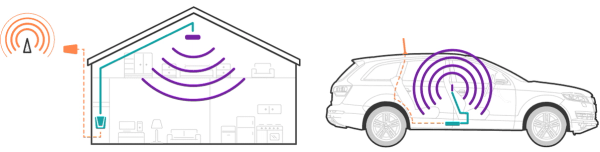
Every cell phone signal booster has three main parts:
- An outdoor antenna that communicates with the tower.
- A signal amplifier that's "bi-directional" - that means it boosts the signal both the "uplink" and the "downlink" paths.
- An indoor antenna that that communicates with the tower.
Cell phone signal boosters are also interchangeably called "cellular repeaters," "cell signal amplifiers," and sometimes "network extenders."
Some cell phone signal boosters are single-carrier and will work with one of AT&T, Verizon, or T-Mobile at a time. Other "broadband" boosters will work with all carriers at once.
How Did You Come Up With This List?
We based our results in this guide on three main sources of information.
Lab measurements
We thoroughly tested all the amplifiers in this list (alongside many others) in our lab to confirm their manufacturer-advertised specs. In particular, we tested gain and output power on the uplink and downlink channels of the five main frequency bands utilized by AT&T.
Real-world testing
But nothing beats real-world testing. So, after testing in the lab, we tested each system in the field with our enterprise installation team.
Our enterprise installation team installs hundreds of boosters in buildings between 20,000 and 500,000 sq ft. They realy know what to look for in terms of installation ease and performance.
Our team of Signal Specialists
Last but not least, we got feedback from our team of Signal Specialists, who provide technical support to thousands of customers each year. Because they talk so many customers through the installation process, they know exactly which boosters customers are most happy with.
Which Booster Specs Should I Care About?
If you look at the user manual or of a cell phone signal boosters, there are a lot of different specs listed.
But here's the low-down: depending on your application and the signal conditions, only one booster spec will matter.
Looking for a booster to be used in a home, office, or other building?
- If the signal outside the building is strong (greater than -80 dBm RSRP), then the most important booster spec is the downlink output power. You won't need much amplification to max out the booster, so the gain specification doesn't matter as much.
- But if the signal outside the building is weak (less than -90 dBm RSRP), then the most important booster spec is its gain. You're unlikely to reach the maximum downlink output power of a booster, so the higher its gain, the greater the coverage of your booster.
If you're unsure whether the signal outdoors is weak or strong, check out our guide to measuring cell signal.
Finally, if you're installing a mobile booster in a vehicle, truck, or RV, then the booster spec that matters the most is the uplink output power.
Still unsure? Read more about this in our signal guide!
Should I Test My Cell Signal Before Buying?
You don't have to, but it might be helpful!
The best signal boosters in this guide will work even when the outdoor signal is very weak.
But if you're on a tight budget, you might be able to save some money with a cheaper booster if you find that your outdoor signal is relatively strong.
You can read more about how to test your cell signal in this guide.
Testing your signal will give you two pieces of information: RSRP and SINR. These terms are specific to LTE networks, so if you only have older 2G or 3G signal, the terms will be different. RSRP is the strength of the signal. SINR is the quality of the signal.
Read more about how to test your cell phone signal on Android and iOS devices.
Are Signal Bars The Same As Signal Strength?
Unfortunately not.
Bars are a bit deceiving. There are two reasons why your bars might be low. Knowing which it is will determine which booster you should purchase.
- Low signal strength: For 4G LTE networks, signal strength is called "RSRP" - Reference Signal Received Power. If your RSRP is less than -80 dBm (e.g. -90 dBm or -100 dBm), your signal is weak.
- Low signal quality: For 4G LTE networks, the measure of signal quality is "SINR" - Signal to Interference Plus Noise Ratio. If your SINR is less than 5 dB (e.g. 2 dB or -1 dB), your signal is low quality.
If you take outdoor signal measurements, you'll know exactly which of those applies. It may be one, both, or neither.
What Are The Best Cell Phone Signal Boosters?
There are many different options, and it depends on your exact application.
But our top choices include:
- The Cel-Fi GO X because it is by far the most powerful cell booster with 100 dB gain.
- A MIMO Panel Antenna Kit if you're boosting cell signal for a hotspot and want the fastest possible data rates.
- The weBoost Home Installed Complete because it comes with nationwide installation.
- The weBoost Drive Reach for cars and pickup trucks.
- The SureCall Fusion4Home if you're looking for a home booster on a tight budget.
Read on for our full guide to the best cell phone signal boosters for more specific recommendations.
What's The Best Booster To Use With A Hotspot/Modem?
All of the signal boosters we list below will work well to improve data rates for a 4G or 5G hotspot or modem.
However, if you're using your hotspot/modem in a fixed location – for example in a home or office – you might want to consider using our MIMO Panel Antenna Kit or MIMO Log Periodic Antenna kits instead.
MIMO antennas will allow you to achieve the very best data rates at home or at the office.
Read our router/modem external antenna guides to find the right kit and connectors for your device.
Which Cell Phone Signal Boosters Support 5G?
If you use AT&T or Verizon, the answer is simple: all of them!
Verizon and AT&T are rolling out 5G on the same frequency bands as their 4G LTE signals. That means that almost every booster that we sell is 5G-ready.
There's one small caveat here: none of the boosters on this list support what AT&T calls "5G+" or what Verizon calls "5G UWB" that run on ultra-high frequency "mmWave" bands. Fortunately, it's quite unlikely that you have mmWave 5G signal: coverage is limited to a sliver of the US population who live in the densest urban areas. Unless you see 5G+ or 5G UWB in your phone's status bar, you needn't worry about it.
If you're on T-Mobile, it's slightly more complicated. The FCC doesn't yet allow boosters to amplify T-Mobile two primary 5G bands (Band 71 and Band 41).
If you're looking to boost 5G signal for T-Mobile, our current recommendation is to use a 5G hotspot along with MIMO antennas.
Are There Real Differences Between Cheap and Expensive Boosters?
Yes, absolutely.
We realize that not everyone has thousands of dollars to spend on an signal booster. That's why we carefully vetted the products in this list to make sure that they offer the best value for money of the boosters on the market today.
Here are a few of the things that differentiate cheaper cell phone boosters from more expensive units:
- FCC certification: For a booster to be legal to use in the US by consumers, it must be certified by the FCC. You can be fined up to $100,000 per incidence for using an uncertified booster. We've carefully vetted all the boosters in this list to make sure they're all compliant and certified.
- Carrier-specific vs Broadband: The FCC divides boosters into these two categories. Carrier-specific boosters can have much more gain, and provide more advanced diagnostics to help aim the outdoor antenna. However, they're also more expensive than broadband boosters that amplify all carriers by a lesser amount.
- Frequency Bands: Not all boosters support the same frequencies. There are 5 main frequency bands that the FCC allows boosters to amplify. Some cheap boosters only amplify a subset of these bands.
- Gain: Gain is a measure of how much a booster amplifies the signal. If you're in a weak-signal area, it's the single most important specification of a booster.
- Downlink Power: The maximum downlink power rating of a repeater determines its maximum coverage area. If your outdoor signal is strong, it's the most important booster spec.
- Uplink Power: The maximum uplink power rating of a signal booster determines how well the booster will perform at the very edges of cell coverage. For mobile boosters used in cars and RVs, this is often the most important specification.
- Cable and Antenna Quality: High-quality cables and directional antennas can make the difference between 1 bar of signal and 5 bars. Lossy cable or poorly designed antennas can ruin coverage.
What are Microcells/Network Extenders?
The AT&T Microcell was a "femtocell" device manufactured by Cisco and sold by AT&T between 2009 and 2017.
MIcrocells utilized a home's broadband Internet connection to create a small 3G cellular network, allowing users to make calls even if cell service was previously weak. Essentially the unit operated like a "mini cell tower" in your home.
AT&T discontinued the MicroCell in 2017, but existing devices will continue to work until AT&T's 3G network is shut down in February 2022.
Verizon sells a device called a Network Extender. It uses a home internet connection to create an "LTE network" at your home. For most users, a Network Extender isn't a great choice: many people don't have reliable enough broadband at home to begin with, which is part of the reason they're boosting their cell signal.
Can I DIY My Own Homemade Signal Booster?
Unfortunately not: it's illegal to make your own signal booster.
To prevent interference, the FCC has very stringent rules that regulate sale and use of signal boosters. Any device that retransmits a carrier's signal needs to be certified as compliant with the FCC's "Network Protection Standard" rules.
These rules ensure that cell phone signal boosters are safe to use, and won't create interference that will prevent towers from working properly.
Operating your own DIY homemade signal booster without getting it certified can result in up to $100,000 in fines.
1,800+ Reviews, 4.93 Average Rating
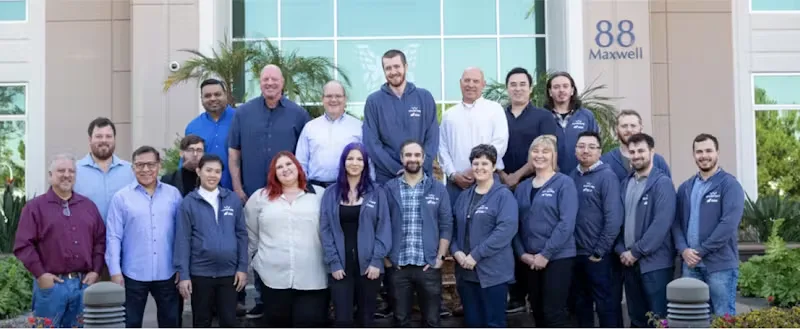
It’s hard to compete with Amazon, but we still think we’re the best place to buy a booster online.
Here are a few reasons to consider buying from us:
- 90-day return policy. Boosters take time to setup, and we want to make sure you’re 100% satisfied with your system.
- Unlimited technical support from a team of product experts with decades of experience between us.
- Over 1,800 customer reviews, with a 4.93 average rating.
- Support a small business that pays fair wages and provides benefits to its employees, including warehouse staff.
For Homes & Small Offices

Pros & Cons
- Up to 100 dB gain
- Unmatched data speeds and coverage, even if signal outside is weak
- Excellent companion iOS/Android app
- Even though 100 dB gain at this price point is excellent value, it's still a pricey system
- No support for T-Mobile 5G.
Summary
Better performance than boosters that cost thousands more
The Cel-Fi GO G41 isn't cheap. But it's still excellent value. Thanks to its 100 dB gain, the GO performs better than boosters that cost thousands of dollars more.
Whole-home coverage
Because of its high gain, the GO G41 will cover thousands of square feet even if your outdoor signal is quite weak.
Excellent app and diagnostic information
The Cel-Fi GO G41 comes with excellent iOS and Android app shows advanced diagnostics, which help with aiming the outdoor antenna
Single carrier, but software-switchable
The GO G41 will only boost signal for a single carrier at a time, but you can switch carriers between AT&T, Verizon, T-Mobile and US Cellular via the iOS/Android apps.
Before You Buy
Verify that you have "usable" signal outdoors.
Even with all it's gain, you need to have at least 1 bar of reliable 4G LTE or 5G signal outside in order for the GO G41 to latch onto.
Note: the GO G41 doesn't support 5G for T-Mobile.
We don't recommend buying the GO X (or, in fact, any booster) if your T-Mobile phone is in range of their 5G network. Instead, look at using a hotspot or 5G router with MIMO external antennas to get the fastest possible data rates.
The Details
We think the Cel-Fi GO G41 is the best cell phone signal booster for homes and offices on the market today.
While it's not exactly cheap, it's still a great value. The GO G41 performs better than signal boosters that cost thousands of dollars more.
Here's why: if you're in an area with weak 4G or 5G outdoors, a booster's "gain" is critical. Gain is a measure of amplification, and determines what kind of coverage area your booster will provide.
The FCC allows two classes of signal boosters to be sold in the US:
- Broadband boosters amplify the signal of every carrier equally, and are limited to 65 to 72 dB gain.
- Carrier-specific boosters amplify the signal of just one carrier at a time but can have up to 100 dB gain.
An extra 30 dB gain might not seem like much, but it actually makes a huge difference. Decibels are a "logarithmic scale" - so 35 dB is actually 3000x more amplification.
Unfortunately, carrier-specific boosters are meaningfully more challenging to build and incorporate a great deal more technology than broadband boosters. That means that they usually cost thousands or tens of thousands of dollars.
That's where the Cel-Fi's GO X comes in: the GO G41 is a carrier-specific, 100 dB booster sold at consumer-level prices.
You're going to see a much bigger coverage area and much faster data rates with the GO X than with almost any booster out there, particularly if your outdoor signal is weak. This also makes the best cell phone booster for rural areas.

Pros & Cons
- Nationwide installation included
- Great aesthetics
- Broadband booster - works with all carriers
- Small coverage area if outdoor signal is weak
- Install quality depends on local tech
- Single indoor antenna only
- No support for T-Mobile 5G
Summary
Need install help?
If so, the weBoost Installed Home Complete might be the right choice. Your Home Complete will include a installation card that allows you to schedule installation, often as soon as the next day.
The Home Complete is a broadband booster
That means its gain is limited to between 63 and 72 dB. it'll work best if you have relatively strong signal outdoors - at least 2 or 3 bars.
Not suitable for commercial spaces
If you're looking for a booster for a commercial space, look at the weBoost Installed Office 200 instead.
Before You Buy
Consider taking signal measurements
If you have an Android phone handy, take signal measurements outside first. This booster will work best if your signal strength (RSRP) outdoors is at least -80 dBm if you're hoping to cover more than a few hundred square feet.
The Details
In partnership with OnTech Smart Services, weBoost is the first booster manufacturer to offer something unique: nationwide installs in any home.
Every weBoost Installed Home Complete package contains a unique code that allows you to reserve an install slot, often on the very next day.
When OnTech's technician arrives they'll be carrying an excellent signal meter: the Wilson Pro Cellular Network Scanner. They'll use the Network Scanner to find the best location and direction for the outdoor antenna.
The kit that's shipped to you won't include any coax cable. Instead, the technician will cut and crimp RG6 coax that they keep on their trucks. Your cable will be cut to exactly the right size, but RG6 attenuates signal more than other cables.
We love weBoost Installed's nationwide installation as an option for customers. If you can't install your own booster, the Home Complete is a great choice.
The Home Complete is a broadband amplifier that's limited by FCC rules to between 63 and 72 dB gain. Unless you have strong signal outdoors, this weBoost system won't cover your whole home or office.
If you're unhappy with the results you're seeing, you can still return the kit and get a full refund. The only caveat to be aware of is that weBoost and OnTech won't patch the holes that they've made in your walls or the exterior of your home.

SureCall Fusion4Home with Panel/Yagi Antennas
A basic cell phone signal booster for those with a limited budget
Pros & Cons
- Simple, well-designed booster
- Directional outdoor antenna
- Small coverage area if outdoor signal is weak
- Uses different cables and connectors on the indoor and outdoor antennas
- No support for T-Mobile 5G
Summary
Solid device for those on a budget
We've heard from hundreds of customers who've tried this booster and had solid results.
Temper your expectations
The Fusion4Home is a budget booster. It'll cover a few rooms or a small area with better signal, but it's not going to blast through a two-story, 4,000 sq ft home.
Before You Buy
Check for usable signal outdoors
Make sure your signal is "usable" for data and calls outdoors before you buy. While cell phone signal boosters will spread that signal indoors, they won't necessarily make the signal faster or better.
Is 500 sq ft coverage enough?
the Fusion4Home will cover up to 1,000 sq ft, but only if you have quite strong signal outdoors (at least 2-3 bars, or -80 dBm RSRP if you're on Android and can measure your signal strength). If your signal is weaker than that, prepare for the coverage area to be limited to 1-2 rooms.
The Details
The Fusion4Home is a solid budget cell phone signal booster. We specifically recommend using the version with a directional outdoor and panel indoor antenna for best results.
The Surecall amplifier boosts all 5 bands authorized by the FCC, and offers solid gain and downlink output power numbers for a broadband, multi-carrier booster in its price range.
While you'll see a meaningful increase in signal strength from your Fusion4Home while you're near the indoor antenna, the coverage area likely won't extend very far. You can only expect a larger coverage area if your signal outdoors is quite strong.
Something a little strange about the Fusion4Home is that it uses F-connectors and RG11 on the outdoor antenna end, but N-connectors on the indoor end. If you want to extend a cable or add extra antennas, make sure you get the right cables!

MIMO Antenna Kits
These antenna kits will get you the very best data rates, but you'll need a hotspot to use them with
Pros & Cons
- Cheaper than a booster
- Will get you the very fastest download speeds
- Require an additional line of service which often means a monthly fee
- Requires a [hotspot with external antenna ports](https://www.waveform.com/a/b/guides/hotspots/)
- Does not help with upload speeds as much as a booster
Summary
Excellent download speeds on a budget
A lot of people looking for boosters are actually looking to use their cellular signal for home broadband. And often they care about getting the fastest speeds possible.
The Details
If you're looking to get the very best data rates possible, using MIMO antennas with a 4G or 5G hotspot or router is your best bet. MIMO antennas work even better than boosters.
Not only are MIMO antennas cheaper than boosters, but they also get you the very best data rates. We couldn't recommend them more highly.
The Waveform QuadMini works with 4x4 hotspots and routers.
For Larger Homes and Offices
Boosting signal in a home or office that's over 5,000 square feet?
If so, you might want to consider a booster designed to provide service in larger buildings.
Boosting signal in larger buildings is complicated. Let us help.
We offer custom system designs for buildings over 10,000 sq ft. Reach out to our commercial team and chat through your project. We'll us the building' floorplans to create a full signal propagation model and design a custom solution to ensure strong coverage throughout the building.

Cel-Fi QUATRA 4000c
100 dB gain, ethernet distribution, and multi-carrier support make for a winner
Pros & Cons
- Uses ethernet cable to distribute signal
- 100 dB gain, yet multi-carrier
- Excellent performance even when signal outdoors is weak
- Cloud monitoring and alarming
- Relatively expensive
- Requires 2 ethernet cables between each network unit and coverage unit
Summary
The best enterprise-grade booster available today
If you're deploying in a home or office that's larger than 10,000 square feet, this is the booster to beat. While it's relatively expensive, it's hard to beat the performance of the QUATRA 4000c.
Product family includes the single-carrier QUATRA 1000 and dual-carrier QUATRA 2000
If you don't need support for all three carriers, but still want the other benefits of QUATRA product line, consider these two more affordable sibling products.
Before You Buy
Talk to one of our Signal Specialists
You can't buy the QUATRA 4000c without working with one of our Signal Specialists. The QUATRA 4000c needs to be sold as part of a custom design.
The Details
When it comes to boosting signal in larger buildings, it's tough to beat the Cel-Fi QUATRA 4000c. Between our enterprise DAS install (buildings 50k+ sq ft) and commercial design teams (buildings 10k to 50k sq ft), we've designed and installed over a hundred QUATRA systems.
Just a few of the things we've come to love about the platform:
- Allows use of ethernet cables to distribute signal instead of coax.
- Offers 100 dB gain for AT&T, Verizon, and T-Mobile
- Unmatched scalability - up to 6 coverage units can be connected to one network unit
- Robust cloud-based monitoring and alarming allows for enterprise-grade SLAs
The QUATRA product lineup has a unique design consisting of Network Units and Coverage Units:
- A "Network Unit" transmits and receives signal from the nearest cell towers. It is connected to outdoor donor antennas via coax, and provides cloud monitoring and alarming functionality.
- Up to 6 "Coverage Units" are connected via ethernet to the Network Units, and distribute signal within the building.
This design allows for coverage to be easily expanded with additional Coverage Units, to serve buildings up to and even over 100,000 square feet in size.
If you're interested in the QUATRA 4000c, reach out to us! We can provide a complete system design for your building.

CEL-FI GO G43 Multi-Carrier Smart Signal Booster
The only booster offering 100 dB of gain across three carriers simultaneously
Pros & Cons
- Universal Coverage for Buildings Up to 20,000 Sq Ft
- Cloud monitoring included
- Full 5G coverage coming via software update in 2024
- Will not support n41, n71, or n77 frequency bands used for T-Mobile 5
Summary
CEL-FI GO G43 is engineered and FCC-approved for up to 100 dB of gain
The 30 dB extra amplification means that the G43 can cover the same area as approximately 11 standard boosters.
The best DAS monitoring tool available today.
CEL-FI’s WAVE portal makes remote monitoring straightforward and enables advanced optimization during installation.
Future-proofed for 5G
CEL-FI GO G43 supports 4G LTE and 5G-DSS out of the box. It will connect to and boost these frequency bands automatically at setup. A firmware update in 2024 will automatically unlock full 5G NR support
Before You Buy
Talk to us
Unsure whether the G43 is a fit? Talk to our Signal Specialists. We can help you take signal measurements and make sure that you're making the right choice.
The Details
There's one big reason why the CEL-FI GO G43 makes it to our list of best signal boosters: no other signal booster offers up to 100dB of gain across 3 networks.
Most signal boosters are limited to 70 dB gain, but thanks to CEL-FI’s proprietary 4th-generation IntelliBoost Chip, the CEL-FI GO G43 is FCC-approved for up to 100 dB of amplification.
The Intelliboost technology dynamically optimizes the boosted signal in real time to provide the best connection possible. The 30 dB extra gain means that the G43 can cover the same area as approximately 11 standard boosters.
The GO G43 also offers users unbeatable remote monitoring. CEL-FI's WAVE Portal, available on desktop, iOS and Android allows users to customise their installation during setup and configure ongoing management.
Finally, this is also one of the best options for 5G boosting and future-proofing installations. At present, the CEL-FI GO G43 supports 4G LTE and 5G-DSS (not quite full 5G).
A firmware update in 2024 will automatically unlock full 5G NR support on the same frequencies it uses today. That's proper, no compromises 5G.
One word of caution - the G43 does not and will not support the n41, n71, or n77 frequency bands used for T-Mobile 5G.

SureCall 5X Max
A booster for commercial spaces that includes an outdoor amplifier
Pros & Cons
- Solid performance even in weaker outdoor signal situations or with longer cable runs
- Includes outdoor amplifier that compensates for signal loss and improves performance
- Relatively expensive
- Utilizes coaxial cable for distribution
Summary
Outdoor in-line amplifier included
The SureCall 5X Max includes an innovative outdoor antenna that allows solid performance even with a long outdoor antenna cable run.
Tried and tested workhorse
The Wilson Pro 70 Plus has been around since 2015 and tens of thousands of units have been deployed.
Up to 20,00 sq ft coverage (but only with strong outdoor signal)
The 4X Max is a broadband cell signal booster. While it has the added benefit of an outdoor pre-amplifier and can cover up to 20,000 sq ft, you'll only cover that large of an area if outdoor signal is quite strong.
Before You Buy
Take signal measurements
We recommend taking signal measurements outside the building before purchasing a broadband signal booster. You'll want at least 2 bars of signal outdoors to get a solid coverage area out of the 5X Max.
The Details
The SureCall 5X Max is one of the only devices that includes an in-line, outdoor-rated pre-amplifier that sits near the outdoor antenna. This pre-amplifier compensates for any cable loss in the outdoor antenna cable run, and maximizes both uplink power and downlink signal sensitivity when the outdoor signal is weak.
Coupled with two indoor antenna ports, the 5X Max is a solid option, particularly if your install location necessitates a longer outdoor antenna cable run.
Our enterprise installation team has tested the 5X Max and they are solid devices if you need multi-carrier coverage and have a long outdoor antenna cable run.
We've only put a few options in this category, but the world of enterprise boosters goes a whole lot deeper.
Honorable mentions go to the SureCall Force5 2.0, Wilson Pro 1300, and Wilson Pro 4300, all of which are excellent broadband devices.
Reach out to our commercial team for specific recommendations based on your building's needs.
For Cars and Pickup Trucks

weBoost Drive Reach
High uplink power make the Drive Reach our top cell phone booster for cars
Pros & Cons
- Unmatched 26 dBm uplink power
- Excellent hardware design
- Relatively expensive
Summary
Uplink power is the spec to check for in vehicle boosters.
More uplink power allows you to connect further from the tower. That's specifically where the Drive Reach shines.
If you have the budget, there's no better cell phone booster for cars and trucks available on the market today.
Before You Buy
Heads up: don't buy the Drive Reach expecting "wireless" coverage.
For best results, you'll want to keep your phone within a couple of feet of the Reach's in-vehicle antenna.
The Details
Vehicle boosters are very different to building boosters.
When you're driving around, you move from areas with very strong signal to areas with very weak signal. It's when you're at the very edge of cell coverage and signal is the weakest that a booster makes a difference.
The reason your phone stops working at the edges of cell coverage in rural areas is that the signal from your phone can no longer reach the tower. The limiting factor is the transmit (or "uplink") power.
The cell tower's signal can easily reach your phone since towers transmit at very high power levels. But your phone is battery-operated and limited in terms of its transmit power, and the signal doesn't make it back to the tower.
That's where a booster can help. And, specifically, it's where the weBoost Drive Reach shines. It has the highest uplink power of any booster on the market at 26 dBm.
The gain of broadband vehicle boosters is limited by the FCC to 50 dB. Unfortunately, that means that in-vehicle boosters are never truly "wireless" - you'll get the best results if you keep your phone within a foot of the indoor antenna. We recommend using hands-free calling for best results.

weBoost Drive Sleek
If you're budget-conscious, take a look at the Drive Sleek
Pros & Cons
- Nicely designed cradle fits almost any phone
- Great value
- Lower performance than our top pick
- Only works with one phone at a time.
Summary
Can't afford to spend $500 on our top pick? The weBoost Drive Sleek will boost signal for a single phone, but don't expect a similar improvement to the Drive Reach.
The Sleek is a "cradle" booster that requires you to place your phone in a holster.
Before You Buy
Make sure you understand the compromises you're making (single-device, lower uplink power/performance) compared to the more expensive Drive Reach.
The Details
At $200, the weBoost Drive Sleek is an excellent value. We're particularly big fans of the cradle format, which keeps your phone near the booster's antenna, even though it limits you to boosting signal for just one phone.
As we explained in our Drive Reach review above, uplink power is the critical spec when it comes to vehicle boosters. The weBoost Drive Sleek is limited to a maximum 22 dBm uplink transmit power, compared to 26 dBm for the Drive Reach. 4 dBm might not seem like a whole lot, but it actually has a big impact on real-world performance.
That being said, the Drive Sleek is less than half the price of the Reach. If you're on a budget, the Sleek is a solid performer that's worth consideration.
For RVs

Pros & Cons
- Unmatched 26 dBm uplink power
- Excellent hardware design
- Limited coverage area - signal drops off quick from internal antenna
- Omnidirectional outdoor antenna makes it less effective when your RV is camped and stationary
Summary
Where the Drive Reach RV shines is in uplink power, which tops out at 26 dBm. When you're out on the edge of coverage, this is the single spec that matters the most. There's no other booster that will work as well as the Reach at the edges of a cellular network.
While the Drive Reach has great uplink power, it is limited by the FCC to just 50 dB gain, which means it won't provide a large coverage area. You'll need to keep your phone or hotspot near the indoor antenna for best results.
Before You Buy
Since the Drive Reach doesn't offer much of a coverage area, you need to figure out how to spread the data rates available next to the booster around the RV and camp site. We recommend either tethering other devices via wifi, or using a 4G/5G hotspot.
The Details
The weBoost Drive Reach RV is our top recommended RV booster. It's high uplink power rating (23 dBm) means that the Reach RV will allow you to connect where other boosters won't.
However, there are two caveats to be aware of:
- The Reach RV is a broadband mobile booster and limited by the FCC to 50 dB gain. This means that it won't have much of a coverage area - you'll need to keep your phone or hotspot near the indoor antenna to connect. You may want to keep one device near the booster and use wifi to connect other devices.
- The Reach RV comes with an omnidirectional outdoor antenna. Using a mast with a directional antenna (see our other recommendations below) may work better when your RV is stationary and parked.
We think the Reach RV is the right compromise between mobility and signal performance for most users, but if you're primarily concerned about boosting signal when your RV is parked and stationary, take a look at our next option.

Pros & Cons
- Includes 25' telescoping mast and directional antenna that help you get above obstructions to the best signal available
- Excellent uplink power rating (25 dBm)
- Can't be used when RV is moving
- A bunch of setup each time you move from one location to another
Summary
If you spend most of your time in your RV camped out in one location, the weBoost Destination RV is the best RV booster available.
Unlike the Drive Reach RV and other mobile boosters, the FCC allows stationary devices to have 65 dB gain. the extra gain allows for wireless coverage up to 30 ft away from the indoor antenna.
Before You Buy
Just remember: the Destination RV can't be used on the road, only when you're parked. It's really the only drawback of the unit.
The Details
Many RVs and trailers spend most of their time stationary in campgrounds. And campgrounds often don't have great cellular signal.
The weBoost Destination RV is designed specifically to provide the best signal when RVs are stationary. With a mast, directional antenna, and up to 72 dB gain, the Destination RV is designed around use in one specific location at a time.
The FCC's rules limit the gain of cellular amplifiers to 50 dB when moving, and to 72 dB when stationary. The Drive Reach operates under the second set of rules for stationary boosters. That means that each time you park your RV, you'll need to pull out the 25' extendible mast, and aim your outdoor antenna towards the nearest tower. But the included mast allows you to get above obstructions to the best cell signal available, and means for those willing to take the extra time, they'll see even better results than with our top-recommended Drive Reach.
If you want connectivity while camped in remote areas, the RV 65 is hard to beat.
For Boats

Pros & Cons
- High uplink power means the best offshore connectivity
- Includes weBoost's tried and tested marine antenna
- Signal attenuates quickly as you move away from rebroadcast antenna, so for best result devices should be kept nearby
Summary
When you're out on a boat, signal gets weak as you move away from shore. The key to better coverage is a booster with high uplink power, and that's where the Drive Reach Marine shines. No other booster compares.
Because the Drive Reach is classified by the FCC as a "mobile booster" it's limited in gain. You won't get a huge coverage area, and might want to consider tethering or using a hotspot to give other devices access via WiFi.
Before You Buy
Make sure you understand the coverage limitations of the Drive Reach. You'll need to keep your phone or hotspot right near the Drive Reach's paddle antenna for best results.
The Details
The weBoost Drive Reach Marine Kit is the best cell phone booster kit for boats on the market today. We've been told time and time again that it provides the best coverage when you're off-shore.
The reason the Drive Reach Marine kit works so well on boats is that it's been designed to have the highest uplink power possible (26 dBm!). When you're at the edges of cell coverage, uplink power is what helps you stay connected for voice and data calls.
However, even though it's our top booster, the Drive Reach Marine isn't without compromises.
Like all marine kits, the Drive Reach Marine is considered by the FCC to be a broadband, "mobile" booster kit. That means it is limited to 50 dB gain. The result of this lower gain number compared to "stationary" boosters is that it won't provide much of a coverage area - just a few feet at most.
So, for best results, you'll need to keep your cell phone or hotspot near the kit's rebroadcast antenna. You may want to consider use a hotspot to rebroadcast the 4G LTE of 5G cellular signal as WiFi if you need wireless cellular coverage.
For 4G/5G Routers and Modems
The best option for boosting signal for 4G and 5G routers and modems actually isn't a traditional "signal booster" at all.
We actually recommend connecting MIMO antennas directly to your hotspot, without any kind of booster at all.
Check out our antenna guides for 4G/5G hotspots to find information specific to your model, or look at the antennas we recommend below.
Some of the most popular hotspots on the market today include the Netgear Nighthawk M1 MR1100 and the Netgear Nighthawk 5G.

Pros & Cons
- Includes everything needed to connect to most hotspots/routers
- Ultra-directional, high-performance external antenna to pinpoint your tower.
- For 2x2 hotspots and routers.
- Works best if you know the direction of your nearest towers or have line-of-sight
Summary
Our MIMO log periodic antennas are our top external choice recommendation if you have a 2x2 hotspot or router.
These antennas have relatively high gain, and work best if you know the direction of your nearest towers, and ideally if you have line of sight.
Before You Buy
Check the connectors on your hotspot or router prior to purchasing.
Most hotspots have either TS9 or SMA external antenna ports, but some hotspots don't have external antenna ports at all, and can't be used with these antennas.
You can also look for your hotspot in our device-specific external antenna guides.
The Details
If you're looking to get the very best data rates possible, using MIMO antennas with a 4G or 5G hotspot or router is your best bet. MIMO antennas work even better than boosters.
Log periodic antennas are highly directional antennas with between 8 and 11 dBi gain. The DualPlus log periodic antenna kits come in either 2x2 or 4x4 configuration and include ultra-low-loss coax cable, adapters, and a mount.
Not only are MIMO antennas cheaper than boosters, but they also get you the very best data rates. We couldn't recommend them more highly.

Waveform QuadPro: 4x4 MIMO Panel Antenna Kit For Hotspots
Use these for an easier, simpler install if you don't know the exact direction of the nearest towers, and you have a 4x4 hotspot or router.
Pros & Cons
- Easier to aim than other MIMO antennas due to lower directivity
- Easy to assemble
- Slightly lower gain than our log periodic antenna kits, and thus slightly lower performance
Summary
If you have a 4x4 hotspot or router, the Waveform QuadPro MIMO panel antenna kit is the best choice.
The MIMO panel has lower gain than our log periodic antennas. As a result, they're less directionally sensitive. That makes them easier to set up and aim.
Before You Buy
Check to see if you can find the location of your nearest cell tower. If you know the exact location and direction of the nearest tower, you might benefit from using log periodic antennas instead.
The Details
This Waveform QuadPro MIMO Panel Antenna Kit includes everything you need to improve signal for your 4G or 5G hotspot or router.
These antennas have slightly lower gain than our log periodic antennas. That makes them meaningfully more forgiving: they're easier to set up and less sensitive to the exact direction of the nearest tower.
About the authors
 Sina Khanifar
Sina is the CEO and co-founder of Waveform, with nearly 20 years of experience in cellular connectivity. Passionate about wireless technology, he stays hands-on and has installed everything from MIMO antennas to full-scale DAS systems. Over the years, he has worked on projects ranging from small residential setups to large commercial deployments. His deep technical expertise allows him to solve complex connectivity challenges with innovative solutions. Sina is committed to advancing the industry and ensuring reliable connectivity for businesses and consumers alike.
About Waveform
At Waveform we help enable reliable cellular connectivity, everywhere. Trusted by thousands of consumers as well as NASA, Tesla, Stanford, and more. Learn more about Waveform
Suggested articles
See All Guides11 Best AT&T Signal Boosters for 2026
By Sina Khanifar · 2 min read
5G Signal Boosters: Read This Before Buying
By Afif Chamas · 4 min read

The Signal Guide
By Triona Giblin · 1 min read