Backup internet, built for working from home.
Never drop off a call again with Waveform Internet. With a second connection sitting alongside your home broadband, you're live at all times, no interruptions.

"With Waveform, it actually works. My primary ISP can drop completely, and my connection stays alive without me even noticing."
Bob R. Verified buyer
30-day free returns · No contracts · Preconfigured for your address
Slow internet can ruin working from home
The camera freezes mid-sentence, your voice turns to gravel, and everyone waits while you drop off and come back. It costs you the thread of the conversation, the authority you'd built up, and the evening you spend redoing work the connection interrupted.
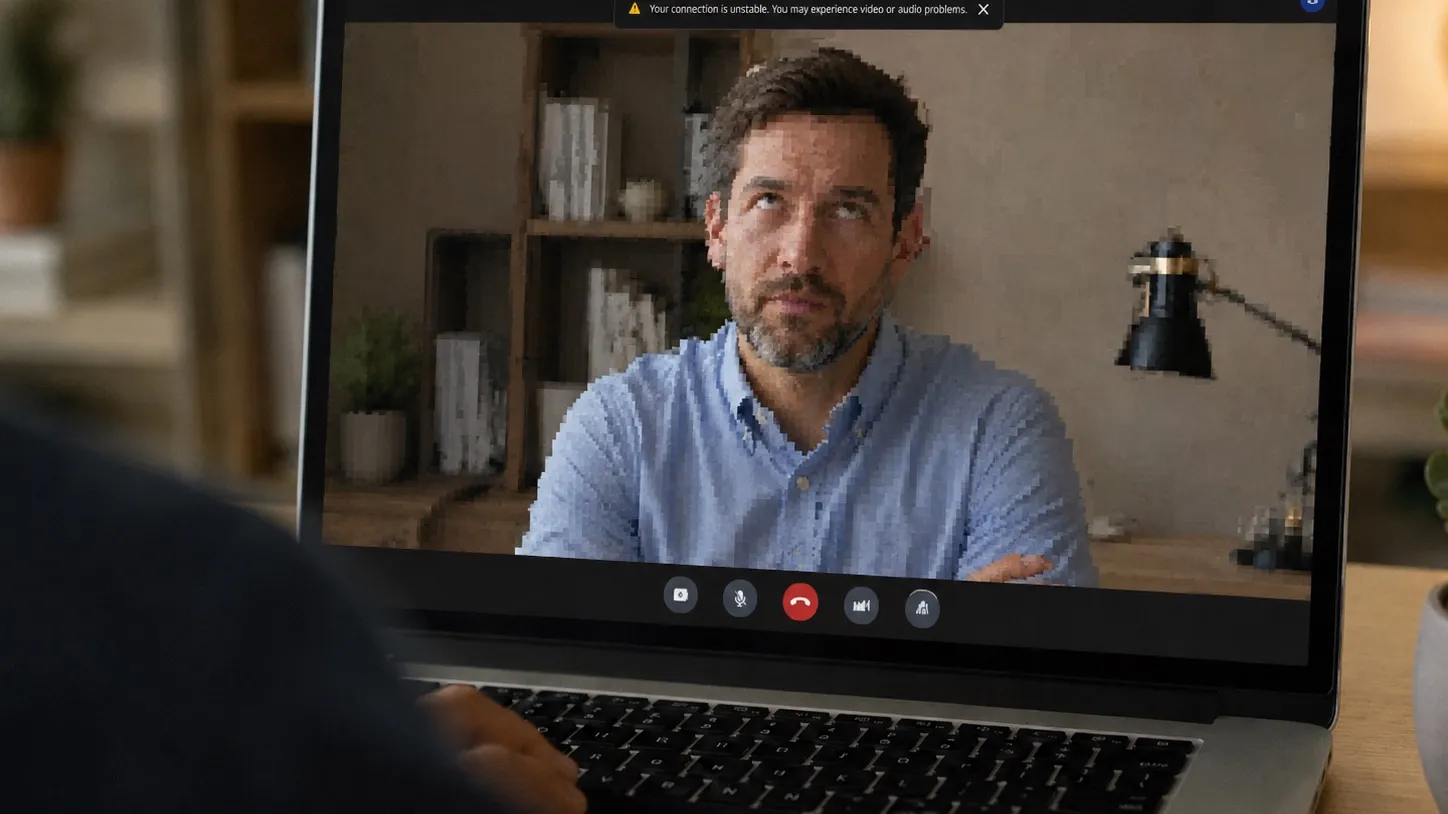
The client call.
You're four minutes into walking them through the proposal when your camera freezes and your voice turns to gravel. Nobody says anything, which is somehow worse, and by the time you're back the conversation has moved on without you.

The one you'd prepared for.
You've apologized for your internet so often it has stopped working as an explanation. Everyone on the call is still gracious about it, but struggling to hide their frustrations.

The shared connection.
Someone upstairs starts a download and your board meeting becomes the least important thing on the network. Your router has no idea which person in this house is being paid to be online right now.

The evening you didn't plan.
The file wouldn't upload at four, so you're doing it at nine. Working from home was supposed to buy back the commute, not spend the evening reclaiming an afternoon the Wi-Fi took.
What's actually breaking
Usually, it's not Zoom, or your laptop, or the VPN. It's the one connection underneath everything, with no backup when internet access drops.
Today: one connection, one failure point
Most homes run video calls, the VPN, streaming, downloads, cameras and everyone else's devices over one internet line. When that line drops or gets congested, everything above it starts failing at once.
With Waveform: multiple networks already working
Waveform adds a 5G connection on a different network and keeps it active alongside your existing ISP. Critical traffic, like video calls, VoIP, and your VPN, can ride both connections at the same time. If one path fails, the other is already carrying traffic.
What Waveform Internet customers say
"We went from $780/month with mediocre performance and a ton of overhead, to $125/month with better performance and basically zero overhead. Someone on their team is actually watching our connection and reaches out before I even notice something's off. This stuff used to require an IT department or an expensive consultant."
Verified buyer · April 2026
"We switched to Waveform from T-Mobile and have had a very positive experience. Our speeds and reliability have improved significantly. … Most importantly, their customer service is top-notch. No chatbots, just real people."
Verified buyer · March 2026
Rated 5.0 by verified Waveform Internet customers. From the team behind Waveform, with 100,000+ systems deployed across all 50 states.
Built for the way you actually work.
Waveform Internet runs your existing ISP and a 5G connection at the same time, so if either drops, you swap over automatically, without any interruptions.
Multiple active networks
Your wired ISP and cellular connection have different failure modes. If one drops, slows down, or gets congested, your desk still has a live path out.
Selective bonding for critical traffic
Video calls, screen sharing, VoIP, and your VPN can use both connections at once for smoother failover. Less critical traffic uses whichever connection is performing best.
Managed by people who know the system
We configure the hardware, supply the SIM, monitor the connection, and handle support. One service, one bill, one team to call.
How bonding and automatic failover work
Your existing ISP carries most everyday traffic. Multiple 5G connections on separate cellular networks run alongside it, active all the time. Video call and VPN traffic goes through an encrypted bonded tunnel, using every available connection at once and exiting through one persistent public IP. Everyday traffic, like streaming, downloads, and browsing, uses the best available single connection.
Built for your desk, starting at
$140/month
On Smart tier backup configuration with Selective Bonding. Includes hardware, SIM, 5G data, monitoring, and support. No setup fee.
Setup in 5 minutes. No professional installation.
Out the box and working before your next call.
Other internet solutions require an engineer visit booked two weeks out, or an evening of your own spent on routers, SIMs, failover rules and testing, and then monitoring forever, both demanding plenty of your spare time.
Waveform Internet doesn't.
Every unit ships preconfigured for the address it's going to. The SIM is installed, the hardware is tested, and the location is already in our monitoring system. Attach the antennas, connect your existing internet line, plug in power, and it comes online.
Delivered
3 to 5 days · Preconfigured for your address
Plug in
Under 5 minutes · No IT needed
Online
Immediately · Multiple networks active
Monitored
24/7 · We usually see issues first
We monitor everything 24/7
Every connection is monitored 24/7 so unexpected outages get caught early. When latency rises, packet loss appears, or cellular signal degrades, our team sees it and fixes it. And if you do need to talk to us, you'll connect directly to the engineers monitoring and fixing it.
Acknowledged in
8 min avg
15 min max
Most issues resolved in
15-20 min avg
30 min max
After-hours resolution
~1 hr avg
1.5 hr max
Not sure where to start?
Talk to the people who built Waveform Internet. Tell us a little about how you work and we'll look at your setup, your connection, and what actually needs protecting, then tell you what we'd recommend.
Thanks, we've got it. One of the team will get back to you about your setup. If you'd rather not wait, check availability at your address in the meantime.

Marcus

Austin

Sisanda

Ruan

Moe

Conold
Common questions from remote workers
If your question isn't here, ask us directly.
Will this work with Zoom, Teams, or Google Meet?
Yes, and there's nothing to install. Your apps never see us; we're the network underneath them. Zoom, Teams, Google Meet, Webex, Slack huddles, your VPN: all of it behaves exactly as it does today. What changes is priority, so a live call gets served ahead of whatever else the house is doing at the time.
Will it actually switch over mid-call?
That's the whole reason bonding exists rather than plain failover. On the Smart tier your call traffic is already traveling both connections at once, so when one of them dies there's nothing to switch to; the copies crossing the other path simply keep arriving. No reconnect, no dropped meeting, no rejoining.
Worth being precise: the cheaper Essential tier does automatic backup rather than hot failover, which means a short interruption while it takes over. If never dropping a call is the reason you're here, Smart is the tier that does that.
What happens during an internet outage?
Ideally you find out later, from us, rather than at the time from the faces on your screen. Traffic moves to the surviving connection by itself, and anything bonded was already traveling both paths when the failure hit. Our team gets the alert directly, so someone is usually looking at it before you've finished the meeting.
How fast is it?
Plenty for a working day, and more than enough for video. Calls, screen sharing, VPN and the household's streaming together are a light load by internet standards, and most of it runs at the native speed of your healthiest connection.
The bonded path is the one exception: it trades top speed for resilience and tops out around 200 Mbps. That ceiling is the hardware doing the encryption, not a cap we've set, and it applies only to traffic in the bonded lane. A high-definition video call uses a few megabits, so it sits nowhere near it.
Can you equip a whole remote team?
Yes, and this is a common one. One account, one point of contact, centralized billing, and a separately preconfigured unit shipped to each person's home address. After go-live we watch every connection around the clock and only escalate the things that need a decision.
Monitoring runs 24/7. Our team is staffed from 6am Eastern to 9pm Pacific, which covers the working day in every time zone your team is in.
There's deliberately no dashboard to log into. Monitoring is part of what you're paying us to do, so we do it, and we get in touch when something needs action.
What hardware do you ship me?
A Core Router configured for your specific address, with 5G built in and the SIM already seated. Where a design calls for extra cellular capacity or another network, we add an Add-On Modem. All of it is commercial-grade Peplink equipment meant to run around the clock. Basements, thick stone walls and back bedrooms sometimes want an external antenna, and we work that out with you before anything ships.
How long until we're online after we order?
About a week, and most of that is shipping. We spend a day or two on configuration before the unit goes to the courier for 3 to 5 days, and the install at your end is measured in minutes. For a team, homes can come online in parallel; the pace is usually set by how quickly people are in to take delivery.
If an address looks like it will need an external antenna, we say so before you order, not after.
Can I keep work traffic separate from the rest of the house?
Yes, and if your employer has security requirements, you probably should. The Core Router supports separate VLANs, so your work devices can sit on their own network, away from the smart TV, the games console and everyone else's laptops, with their own rules and their own priority. Traffic through the bonded tunnel is encrypted in transit. If your IT team has a checklist, send it over and we'll go through it with them.
What if the problem is my Wi-Fi, not my broadband?
Then we're honestly not the fix, and it's worth knowing that before you spend anything. If your calls break up because the Wi-Fi doesn't reach your desk, a second internet line changes nothing; the traffic is already failing inside your house. A wired run to the desk, or a better access point, is the cheaper answer and we'll tell you so.
Where we do help is everything past your front door: the connection itself, the neighborhood congestion at 4pm, the outage that takes your whole street off. Tell us what the failure actually looks like and we'll tell you honestly which of the two it is.
What's the difference between failover and bonding?
Failover is sequential. One connection dies, another takes over, and there's a gap while that happens, which is how most backup products behave.
Bonding removes the gap by running connections simultaneously. We bond selectively, reserving it for traffic where an interruption is visible to other people, like video calls, VoIP and your VPN, and let everything else fail over intelligently instead.
Do I need a technical person to set this up?
No. Configuration happens here before we ship, and the physical install is antennas, two cables, and a wall outlet. Anything that needs adjusting later, we adjust remotely. You don't have to become the network person.
How does this compare to T-Mobile Business Internet Backup?
It's a reasonable product for what it is: one 5G connection that steps in after your ISP fails, at a lower price than ours. If a brief gap during the switch is tolerable and nobody needs to be watching it for you, it may well be enough.
We're built for the people for whom the gap is the problem. Multiple connections running at once, bonding on the critical traffic, hardware and SIM included, monitoring around the clock and a team on the other end of it. The extra cost buys the difference between a spare tire and a second engine already running.
Will my employer pay for this?
Often, yes. Plenty of companies already reimburse home internet, and a second connection for someone who is client-facing or on calls all day is an easier case to make than most home-office spending. We invoice monthly, so it goes through expenses like any other subscription.
If it's easier for your employer to buy it directly, we can bill them instead and ship to your address. Tell us which way round you need it and we'll set it up that way.
Can I use this as my primary internet?
You can, and some people do, but for working from home it's usually the wrong shape. Keeping the broadband you already have and adding an active cellular path gives you two kinds of infrastructure instead of one, which is the entire point. Primary earns its place when your home broadband is genuinely bad rather than occasionally unreliable, or when there isn't usable internet at the address at all.
Does this work in rural areas without fiber?
Often, yes, and rural addresses are where home broadband tends to be least reliable in the first place. We test coverage against your exact address before anything ships and tell you plainly what to expect, including when the answer is that your address is marginal. Where signal is thin an external antenna usually settles it, and where it genuinely isn't there we'll say so rather than sell you a box that won't work.
Does this work with Starlink?
Yes, happily. A dish can be one of the connections we manage, and for genuinely remote homes it's often the right architecture. Satellite and cellular fail independently, where two wired providers often hang from the same pole down the road.
How much data does it use? Are there overage fees?
No overage fees, ever, and everyday traffic carries no cap at all. The bonded path is the only thing we meter: 250 GB a month on Smart, and everyday traffic doesn't count against it.
Video is the thing to do the arithmetic on, since a bonded call runs roughly a gigabyte or two an hour. A normal week of meetings sits comfortably inside the allowance; six hours a day on camera is a different conversation, and one worth having with us before you order rather than in week three. If you do go over, we'll usually just cover it and come to you about a bigger allowance if it becomes a habit.
What if it doesn't work at my address?
Send everything back inside the first 30 days for a full refund, hardware included, with no restocking fee and no one making it awkward. It doesn't happen often, because coverage gets checked against your address before we ship, but the exit stays open.
What if I move house?
It comes with you. The service is month to month and there's no relocation fee. Tell us the new address and we'll check coverage there, reconfigure the router remotely and update the monitoring, so it works on day one rather than after another two-week wait for an engineer.
If the new place turns out to have poor cellular coverage, that's one of the situations the 30 days is there for. We'd rather tell you before you move than argue about it afterwards.
Is there a contract?
No. The service is month to month; leave whenever you like. Hardware works one of two ways: buy it upfront and it's yours from day one, or rent it monthly for as long as you're a customer and send it back when you stop. And the first 30 days work like a trial: if it's not the right fit, everything goes back for a full refund.
Can I keep my existing router or networking gear?
Usually, yes. We slot in upstream of your current router and take over the multi-WAN decisions, and everything behind it keeps working exactly as it does today. Setups with more moving parts, like a mesh system, a NAS, or work kit that needs a fixed address on the network, get a quick design review with us before anything ships.
Backup internet that keeps you on the call.
30-day free returns. No contract. Real human support to keep you online.
Running a different business?
Every business breaks differently when the internet goes down. Pick the industry closest to yours and we'll show you what we protect and what it costs.