
















Peplink MAX BR2 External Antenna Guide
Why you can trust Waveform
Waveform is the leading provider of solutions for improving cellular signal and connectivity. Our team of experts has decades of combined experience in wireless communication and remains committed to providing honest, data-driven reviews and recommendations. We rigorously test every product we sell and maintain complete editorial independence. No company can pay to influence our reviews or product ratings.
Read more about Waveform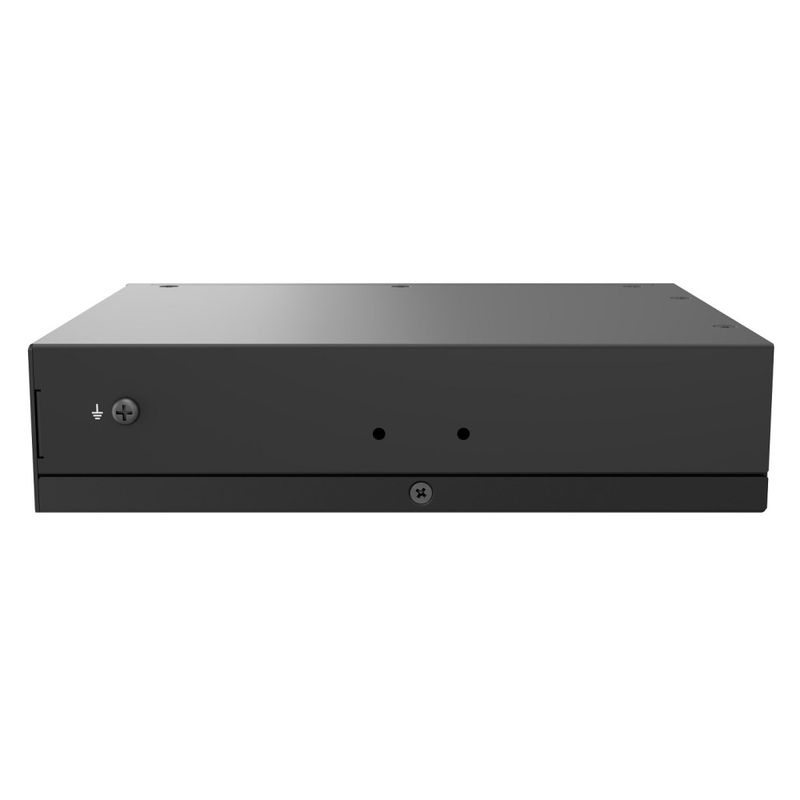
Looking to get the best possible data rates from your Peplink MAX BR2?
You’ll want to purchase and connect the Waveform OmniRoam 7-in-1 Mobile Antenna to the device’s four SMA cellular ports, two Wi-Fi ports, and GPS port.
In this guide, we'll:
- Show where the cellular, Wi-Fi, and GPS SMA ports are located.
- Explain how to attach the OmniRoam unit.
Please note that this guide is for the Peplink MAX BR2 unit. If you have the Peplink MAX BR2 Pro router, you will want to use our other guide here. The Pro version has more ports and needs different OmniRoam units!
Best Antennas for the Peplink MAX BR2
Using a MIMO antenna can help you get the fastest LTE data rates possible.
The Peplink MAX BR2 has SMA connectors. The four cellular ports, the two Wi-Fi ports, and the GPS port can be found at the back of the device.
We recommend the OmniRoam 7-in-1 Mobile Antenna to optimise all 7 different ports.
Before attaching the Peplink to the antennas, you’ll want to install the OmniRoam in your vehicle.

There are multiple versions of the OmniRoam. Make sure you choose the 7-in-1 version, as it is needed to boost all four cellular ports, both WiFi ports, and GPS.
Why External Antennas Are Critical for Improving Data Rates
Most people think that external antennas primarily help you increase your data rates by increasing the signal strength. But that's not the case.
An increase in signal strength is often less important than other ways that external mobile antennas help.
Here are the three main ways that mobile antennas help you increase your data rates on the move:
1.They Improve Signal Quality
Vehicle antennas improve SINR (Signal to Interference plus Noise Ratio), allowing higher data rates through better modulation schemes. Proper mounting and positioning on your vehicle is crucial for optimal performance.
2.They Allow You To Connect On More Bands
Modern vehicle routers can use multiple cellular bands simultaneously through carrier aggregation. External antennas help access higher frequency bands that typically can't penetrate vehicle bodies, often providing faster, less congested connections.
3.MIMO Isolation
Vehicle-mounted antennas provide better MIMO (Multiple Input Multiple Output) isolation than internal antennas, enabling cleaner simultaneous data streams. This results in higher bandwidth and more stable connections while driving.
Installing the OmniRoam 7-in-1
We've compiled a detailed instruction manual to accompany the OmniRoam, where we go into depth on the best ways to install the kit.
The OmniRoam has three different mounting options:
- Magnetic
- Adhesive
- Spigot
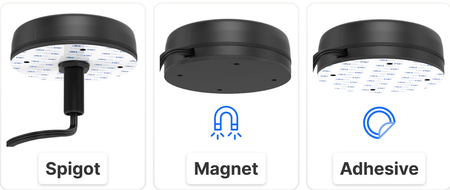
Choose the positioning that best suits your vehicle's needs.
You don't need to worry about the two units being positioned too close or too far apart - they won't interfere with each others' performance.
As well as in the manual, you can also find a detailed description of each mounting option in the product video:
Once you're happy with your install, it's time to connect the Peplink MAX BR2!
The Peplink MAX BR2 has SMA connectors. The four cellular ports, the two Wi-Fi ports, and the GPS port can be found at the back of the device, as pictured below:
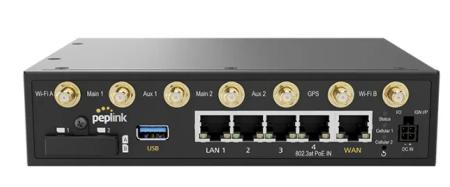
Connect your cables to your Peplink MAX BR2's antenna ports and hand-tighten.
Use the labels indicating the cellular (magenta), WiFi (white) and GPS (blue) cables and connect each to the right port. The order in which you connect the cables to the router doesn’t matter.
Once everything is connected, you're ready to enjoy reliable connectivity on the road!
About the authors

About Waveform
At Waveform we help enable reliable cellular connectivity, everywhere. Trusted by thousands of consumers as well as NASA, Tesla, Stanford, and more. Learn more about Waveform
Suggested articles
See All Guides
Peplink Balance 20X External Antenna Guide
By Austin Rutten · 11 min read
MOFI4500-4GXeLTE External Antenna Guide
By Triona Giblin · 8 min read
Chester Ninja External Antenna Guide
By Afif Chamas · 5 min read