
















Rogers Nokia FastMile 5G Gateway 3.2 External Antenna Guide
Why you can trust Waveform
Waveform is the leading provider of solutions for improving cellular signal and connectivity. Our team of experts has decades of combined experience in wireless communication and remains committed to providing honest, data-driven reviews and recommendations. We rigorously test every product we sell and maintain complete editorial independence. No company can pay to influence our reviews or product ratings.
Read more about Waveform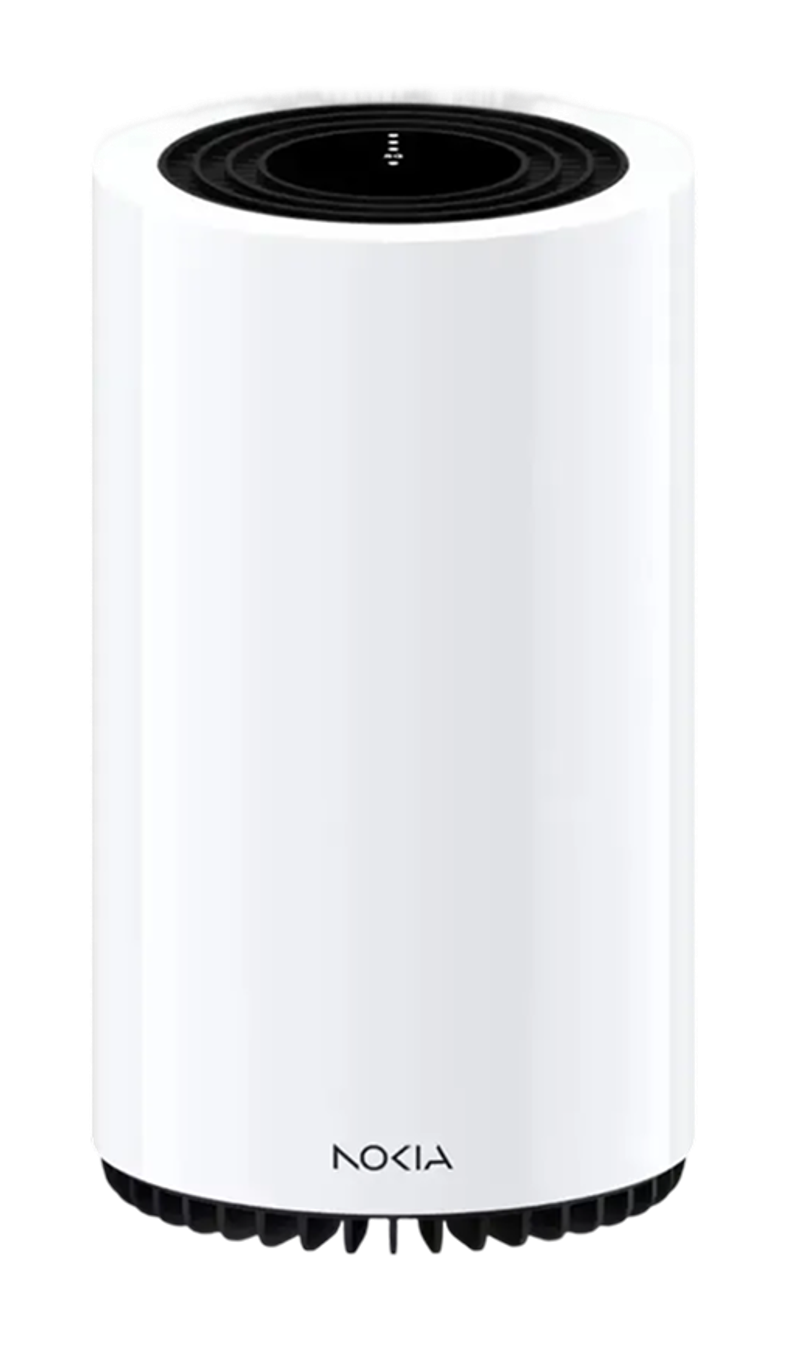
- Accessing the Nokia FastMile's Hidden Antenna Ports
- The Best External Antennas for the Rogers Nokia FastMile 5G Gateway
- Why External Antennas Are Critical for Improving Data Rates
- Installing MIMO Antennas to the Rogers Nokia FastMile 5G Gateway
- Step-by-Step Guide to Installing Adapters for External Antennas
- Positioning and Aiming MIMO Antennas
- Antenna Port Specifications
- Complete Breakdown
- Other Helpful Resources
- The Rogers Nokia FastMile 5G Gateway Documentation
Looking to get the best possible data rates from your Nokia FastMile 5G Gateway?
You’ll want to purchase and connect external MIMO antennas to the device’s four SMA ports.
In this guide, we'll:
- Recommend the best external antennas to use.
- Show where the cellular U.FL ports are located.
- Explain how to aim the antennas for best results.
Accessing the Nokia FastMile's Hidden Antenna Ports
Using a MIMO antenna outside your building, pointed at the nearest tower, can help you get the fastest 4G and 5G data rates possible.
The Rogers Nokia FastMile 5G Gateway has eight internal U.FL ports, which allow for two 4x4 MIMO antennas to be connected to the device.
The antenna ports aren't accessible from the outside, you'll need to open the device and make minor modifications to reach them.
Don't fret - we'll walk you through it step-by-step. All you really need is a screwdriver.
NOTE: To connect external antennas you'll need to open and modify your Rogers Nokia Gateway. Read our instructions carefully to avoid damaging the device. Gateways are owned by Rogers, and breaking the tamper seals may result in charges.
The Best External Antennas for the Rogers Nokia FastMile 5G Gateway
We recommend two different MIMO antenna options for use with the Nokia FastMile 5G Gateway.
The easiest antenna choice for most people is our QuadMini Duo Antenna Kit. With up to 5.2 dBi of omnidirectional gain and multiple mounting options, it is designed to be extremely simple to install outdoors or indoors, at home or in an RV.

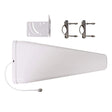
However, if you're willing to spend a little bit of time aiming, our QuadPro Duo 8x8 Antenna Kit will generally get you the fastest data speeds, thanks to its 9.1 dBi of directional gain. This is particularly important if you're on the edge of coverage, or have very weak signal.

Why External Antennas Are Critical for Improving Data Rates
Most people think that external antennas primarily help you increase your data rates by increasing the signal strength.
But that's not the case.
An increase in signal strength is often less important than other ways that external antennas help.
Here are the three main ways that external antennas help you increase your data rates:
They Improve Signal Quality
In 4G LTE and 5G networks, signal quality is measured as SINR (Signal to Interference plus Noise Ratio) or sometimes as RSRQ (Reference Signal Received Quality).
Improving signal quality has a huge impact on your data rates.
Higher data rates allow your hotspot to communicate using "higher order modulation schemes." That means they can use the same wireless spectrum to send more data per second.
However, there's one big caveat:
In order to improve your signal quality, you need to both aim and shield your outdoor antenna properly. We talk more about this in the next section.
They Allow You To Connect On More Bands
Gateways like the Rogers Nokia FastMile 5G support an LTE feature called "carrier aggregation."
Carrier aggregation allows the Gateway to connect on multiple cellular bands simultaneously.
The more bands you're connected to, the greater the bandwidth, and the higher your data rates.
However, many of the higher frequency bands aren't able to penetrate into buildings. Using external antennas allows you to access higher frequency bands, which are often less congested and offer higher speeds than lower frequency bands.
They increase MIMO Isolation
MIMO (Multiple Input Multiple Output) technology uses signals travelling along multiple paths simultaneously, increasing both bandwidth and reliability in wireless connections.
MIMO isolation is the antenna's ability to handle several data streams at once, cleanly and without interference, leading to quicker data speeds and steadier connections
Our external antennas are specifically designed for superior MIMO isolation, and dramatically outperform standard built-in antennas found in most home devices.
This means you'll see a more reliable connection with enhanced bandwidth, ensuring smoother streaming, gaming, and browsing with minimal interruptions.
Installing MIMO Antennas to the Rogers Nokia FastMile 5G Gateway
In the next section of this guide, we'll show you how to open up your Gateway, connect adapters for external antennas, and close it back up.
Before you get started, you will need the following:
- A small phillips head screwdriver
- A Torx T10 screwdriver
- A thin plastic prying tool, needle-nose pliers, or tweezers
- Eight U.FL to SMA-Female pigtail adapters (included in our Antenna kits)
- Tape for securing and labelling cables. Painters or Electrical tape works best.
- A secure container to keep screws and small parts safe while you work
Step-by-Step Guide to Installing Adapters for External Antennas
Step 1: Power off the Rogers Gateway and unplug the power cable.
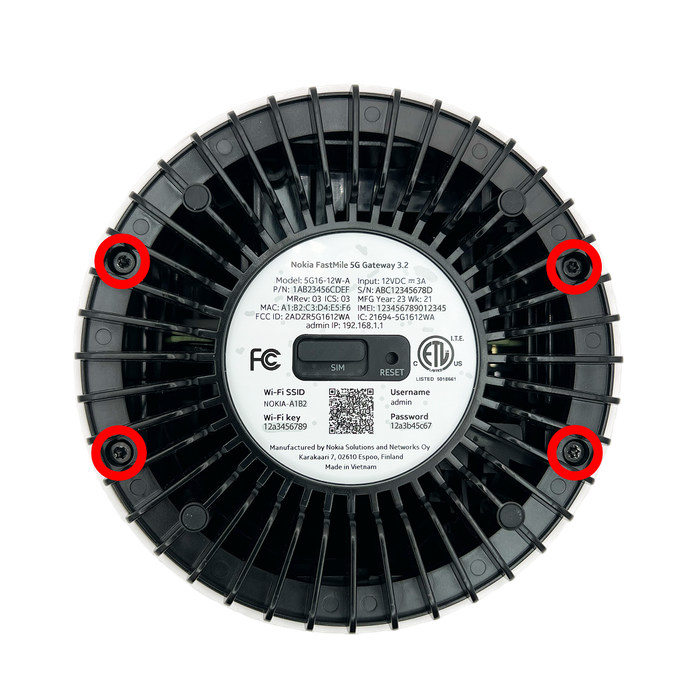
Step 2: Using a Torx T10 screwdriver, remove the four screws located on the bottom of the device. Set the screws aside somewhere safe.
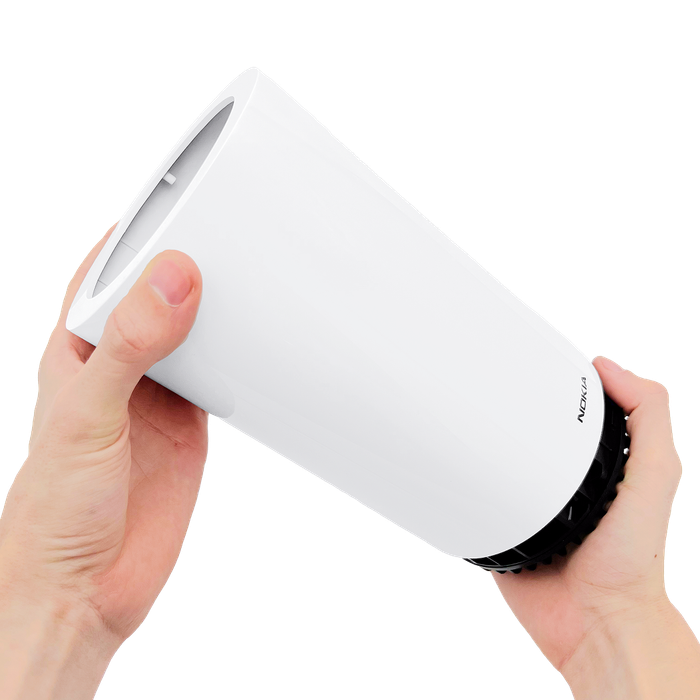
Step 3: With the screws removed, slide the outer cover upward and lift it off to expose the inner enclosure.
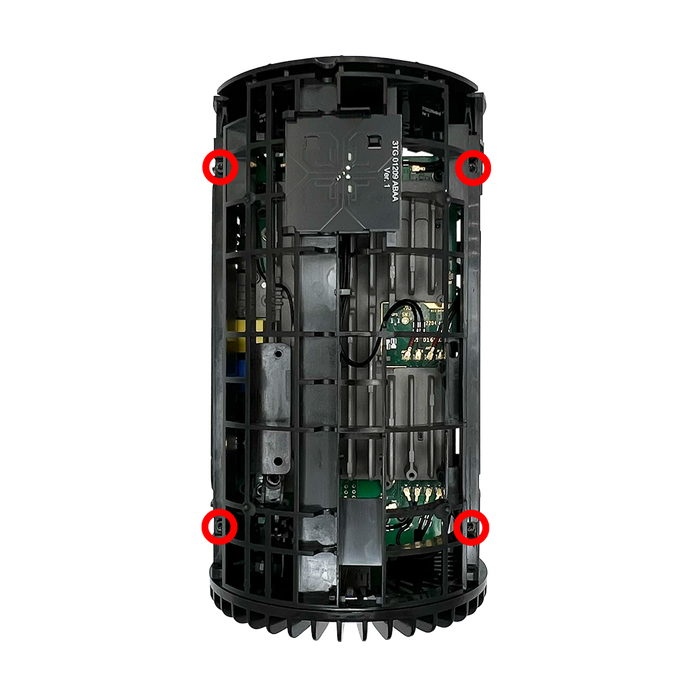
Step 4: On the exposed inner enclosure, remove the four Torx T10 screws securing the inner frame.
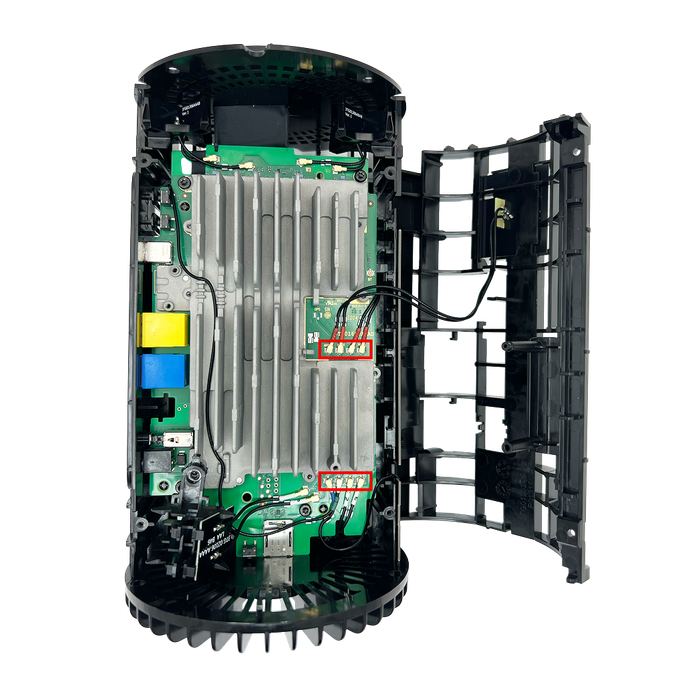
Step 5: Gently pull the side panel of the inner enclosure outward. Swing it open and lay it to the side of the device to expose the internal antenna ports.
Step 6: You will now see eight factory antenna cables attached to the board. Using a prying tool or tweezers, carefully disconnect all eight antenna cables.
Step 7: Wrap tape around the connectors to prevent shorts, then move the cables to the side of the enclosure. Take note of the number for each port.
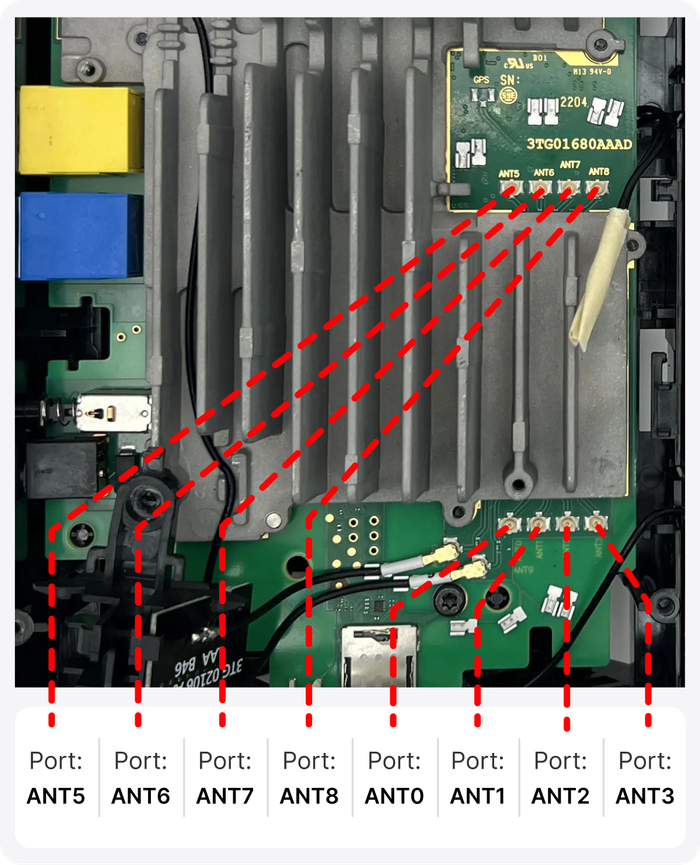
Step 8: Route your eight U.FL pigtail adapters through the vents on the bottom of the enclosure. Attach the U.FL pigtails to the newly available ports.
Tip: When connecting the four U.FL pigtails for ANT 5-8, angle the connectors upward and route the cables to the right. Use the hooks on the right side of the inner enclosure to help hold the cables in place.
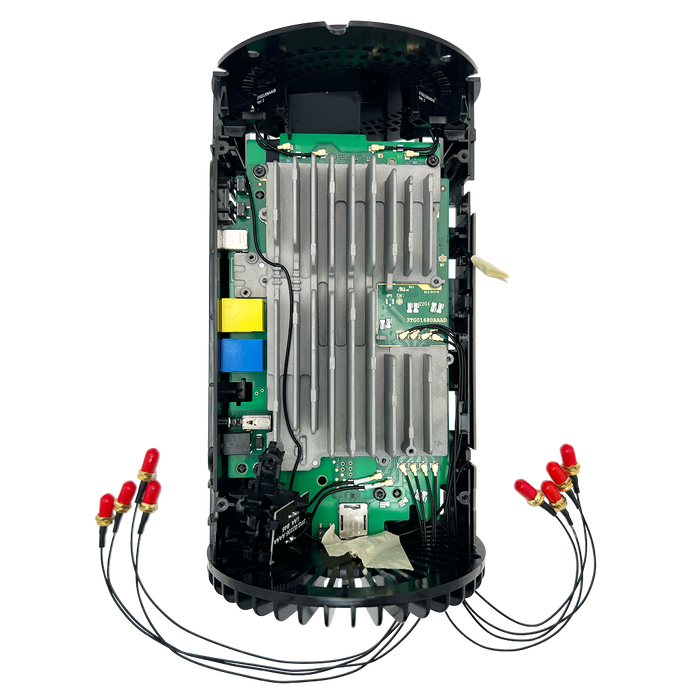
Step 9: Once all eight pigtails are connected, attach a small piece of tape to each SMA end and label it with the corresponding port number. This makes external antenna hookup much easier later.
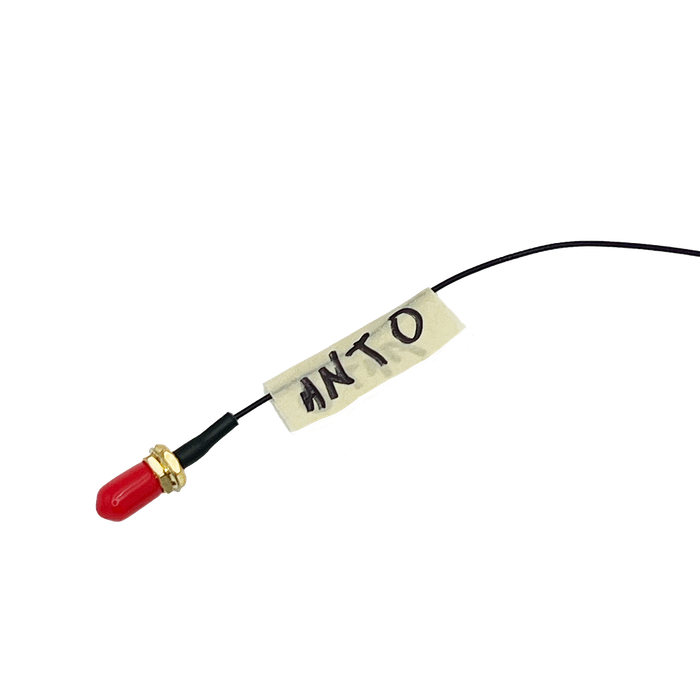
Once you've done all eight, it should look something like this.
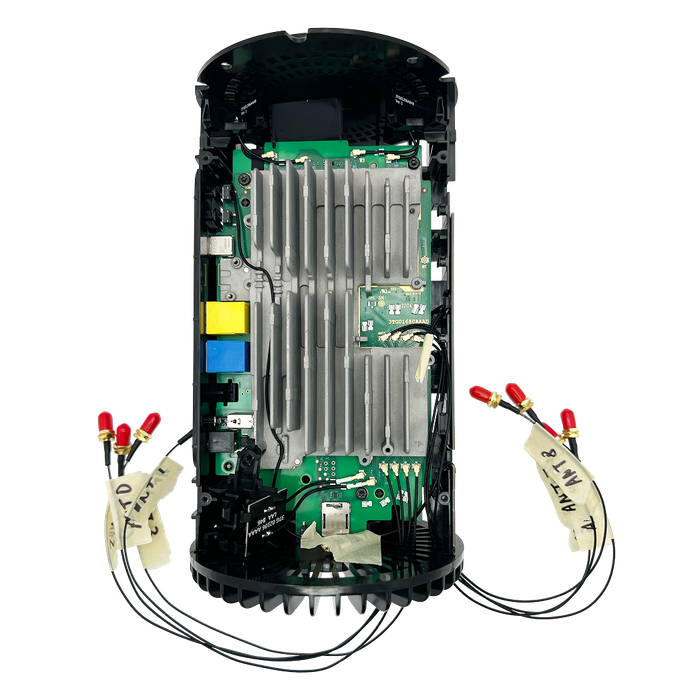
Step 10: Reassemble everything in reverse order:
- Close the inner enclosure side panel.
- Reinstall the four Torx T10 screws securing the inner enclosure.
- Slide the outer housing back into place.
- Reinstall the four bottom Torx T10 screws.
Make sure the side panel fully seats - if it catches, gently adjust the cable routing.
With the gateway fully reassembled, your eight SMA-labeled pigtail adapters should now protrude cleanly from the bottom vent area.
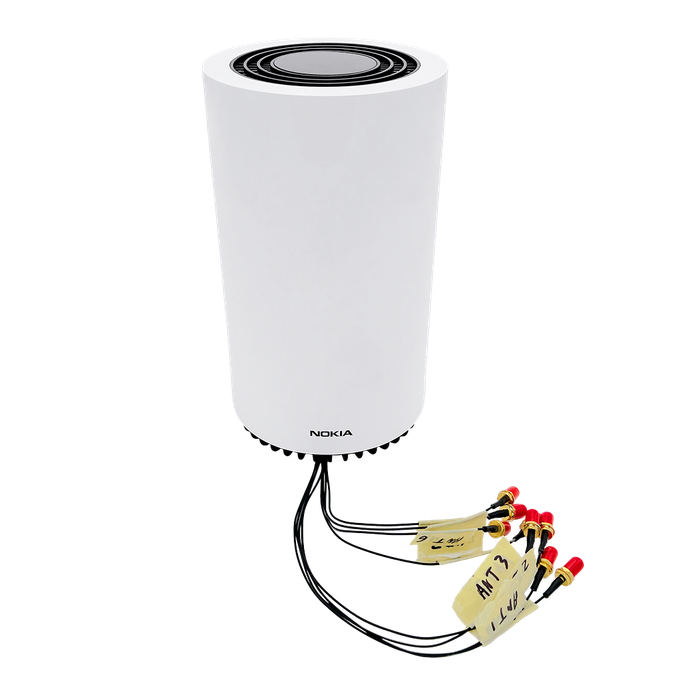
Step 11: Connect your external MIMO Antennas to the labeled adapters installed in your Gateway in the order shown below:
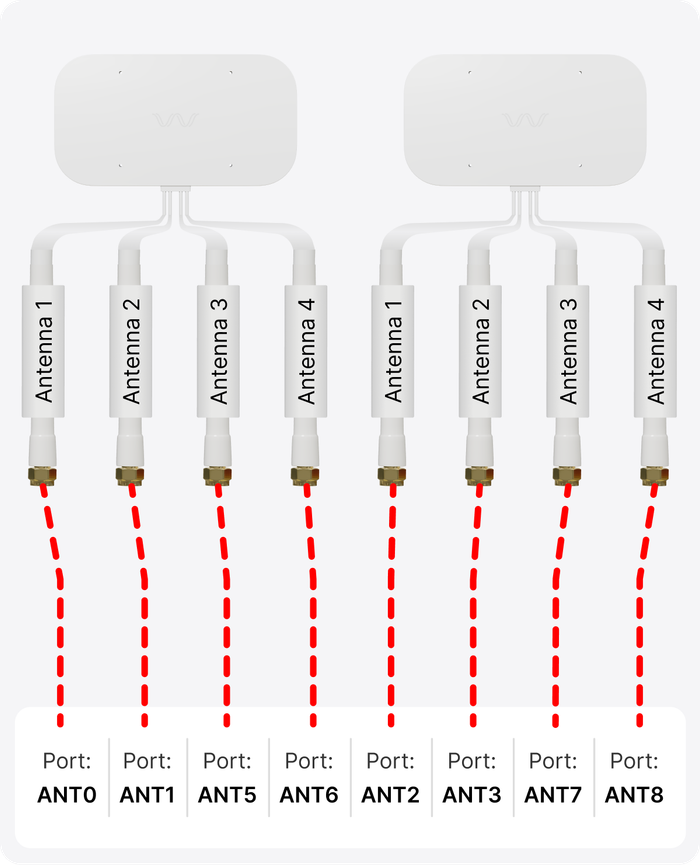
This order ensures that each antenna receives a balanced mix of high- and low-frequency bands. Grouping all high or all low bands on a single antenna can create imbalance and cause placement or performance issues in an 8×8 MIMO system.
Congrats! Your Rogers Nokia 5G Gateway is now connected to your more powerful MIMO External Antennas.
Positioning and Aiming MIMO Antennas
Positioning and aiming your external MIMO antennas well is crucial to getting the best performance to your Rogers Nokia FastMile 5G Gateway, or indeed any other router or hotspot.
We've actually compiled detailed instruction manuals to accompany our own MIMO Antenna Kits, where we go into depth on the best ways to aim the antennas. See QuadPro Duo's manual and QuadMini Duo's manual here.
The goal is to find the best location and direction for the antennas to maximize data rates to the hotspot. It can take a little patience, but can have a huge impact – it’s worth a bit of extra effort!
Once you've got your external MIMO antennas connected, you're ready to go outside with your "test-rig".
With each location and direction you try, run a couple speed tests, and make a note of the results. Here are all the locations and directions where we recommend testing your MIMO antenna:
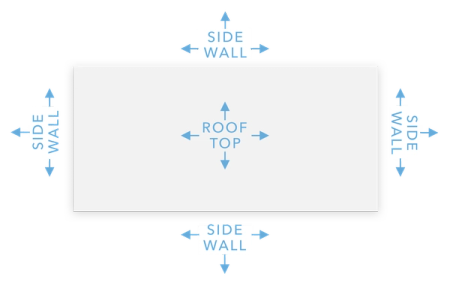
Pro Tip 1: Don’t just go to the highest point of the roof! While signal is generally stronger the higher you go, there’s also often more interference. We’ve found it’s often better to mount the antenna(s) on the side of the building where the structure can shield the antennas from interference.
Pro Tip 2: When you make bigger changes, try either power cycling or removing and re-inserting the SIM card. This forces the gateway to search for the best signal anew and can help improve data rates.
Once you've found the position which gets you the fastest connection to the T-Mobile Gateway, that's where you'll want to install the MIMO antenna. Go ahead and mount the antenna, run cables inside, connect everything up, and enjoy superior data rates!
Antenna Port Specifications
The FastMile uses a mixture of single-element LTE antennas, cross-polarized dual-element antennas, and dedicated Wi-Fi and GNSS antennas.
Cellular / 5G antenna ports:
ANT0, ANT1, ANT2, ANT3, ANT5, ANT6, ANT7, ANT8
Other antenna ports:
ANT9, ANT10, WIFI A1, WIFI A2, WIFI B1, WIFI B2
Key Terms
PRX = Primary downlink receiver
DRX = Diversity downlink receiver
Tx = Uplink transmitter
LB = Low Band
MB = Mid Band
HB = High Band (C-Band / n41 / n77 / n78)
MIMO Couplet:
PRX ↔ DRX
PRX2 ↔ DRX2
PRX3 ↔ DRX3
PRX4 ↔ DRX4
Complete Breakdown
LTE / 5G NR Antennas
Low–Mid Band LTE Antennas
ANT0 (Blue) – LTE A
- Bands:
LTE: B7, B26, B41, B41 CA, plus low/mid bands for: n2, n5, n12, n25, n66, n71 - Role: Primary LTE low/mid-band antenna
- Type: Monopole
- Typical function: Coverage, control channels, LTE fallback
ANT1 (Grey / Green) – LTE 2
- Bands: Companion low/mid-band LTE (paired with ANT0)
- Role: Secondary LTE low/mid-band antenna (diversity / MIMO partner for ANT0)
- Type: Monopole
ANT0 + ANT1 form the main LTE low/mid-band pair, handling general 4G coverage and control.
5G NR Mid–High Band Antennas
These are the important ports for mid/high-band 5G (n41/n77/n78) and CBRS-range operation.
ANT5 (Red) – 5G SRS
- Bands: B42; NR: n38, n41, n48, n77, n78
- Role: Part of primary 5G mid/high-band array
- Type: 2x2 cross-polarized antenna element
ANT6 (Red) – 5G SRS
- Bands: NR: n38, n41, n48, n77
- Role: Paired with ANT5 as a 2x2 cross-polarized 5G antenna (UL/DL MIMO)
- Type: 2x2 cross-polarized antenna element
ANT7 (Red) – 5G SRS
- Bands: Same physical antenna family as ANT5/6; used for additional mid/high 5G NR chains
- Role: Part of second 2×2 5G mid/high-band antenna
- Type: 2×2 cross-polarized antenna element
ANT8 (Red) – 5G SRS
- Bands: Companion to ANT7 (mid/high 5G NR)
- Role: Completes the second 2×2 5G mid/high-band antenna
- Type: 2×2 cross-polarized antenna element
ANT5 - ANT8 together form the gateway’s 4×4 5G NR mid/high-band MIMO array, covering n41 / n48 / n77 / n78 and related LTE high bands (e.g. B42). These are the ports to target for external 5G antenna work.
Wi-Fi Antennas
The FastMile 3.2 supports 4×4 802.11ax at 2.4 GHz and 4×4 802.11ax at 5 GHz.
2.4 GHz Wi-Fi
ANT2 (White)& ANT3 (White) – “MH ANT 2.4 GHz”
- Bands: 2.4 GHz WLAN
- Role: Main external 2.4 GHz Wi-Fi antenna pair (2×2 cross-polarized)
- Type: Single 2×2 cross-polarized antenna assembly
5 GHz / LTE B46 Wi-Fi / LAA
ANT9 (White) & ANT10 (White)
- Bands: LTE B46 / 5 GHz range (LAA)
- Role: 5 GHz Wi-Fi / LAA antenna pair (cross-polarized)
- Type: Single cross-polarized antenna assembly
Internal Wi-Fi Chains (Short Black Cables)
- WIFI A1 (Black)
- WIFI A2 (Black)
- WIFI B1 (Black)
- WIFI B2 (Black)
These four short black cables form the 4×4 2.4 GHz and 4×4 5 GHz Wi-Fi arrays (A and B chains).
All are cross-polarized elements, used for MU-MIMO operation inside the chassis.
ANT2/ANT3 and ANT9/ANT10 handle the main external Wi-Fi/LAA paths, while the four black “WIFI A/B” cables provide internal 4×4 Wi-Fi chains.
IoT / Bluetooth Antenna
ANT4 – (Likely Bluetooth / IoT)
- Marked simply as a separate antenna in teardown
- Bands: 2.4 GHz short-range (typical for BLE/IoT)
- Role: Local Bluetooth / IoT / Matter connectivity
GNSS / GPS Antenna
The FastMile 3.2 includes integrated GNSS (GPS/GLONASS/Galileo/BeiDou) support as per the user guide, but the GNSS element appears as a dedicated PCB antenna rather than a removable cabled port.
- Role: Positioning and timing for the gateway
- Location: Internal; not normally used for external antenna mods
Other Helpful Resources
The Rogers Nokia FastMile 5G Gateway Documentation
About the authors
 Sisanda Kheswa
Sisanda Kheswa is a Junior Product Manager at Waveform, where she owns the company’s third-party product business end-to-end — finding the products worth carrying, negotiating with vendors and distributors, running the launches, and keeping the unit economics honest. She also owns how those products show up for customers on the website and Amazon listings. She came to product from law, with an LLB and a postgraduate degree in intellectual property — which turns out to be good training for the work, since both are about reading complicated systems carefully and advocating hard for the person whose interests are on the line. In her case, that person is always the customer: she spends most of her time gathering real insight, surfacing the problems worth solving, and making sure the customer’s voice stays primary to what Waveform builds and sells.
About Waveform
At Waveform we help enable reliable cellular connectivity, everywhere. Trusted by thousands of consumers as well as NASA, Tesla, Stanford, and more. Learn more about Waveform
Suggested articles
See All Guides
Inseego Wavemaker 5G FG2000 Optimization Guide
By Austin Rutten · 6 min read
Inseego Wavemaker 5G FX3100 Antenna Guide
By Afif Chamas · 8 min read
TravlFi XTR Pro 5G External Antenna Guide
By Triona Giblin · 2 min read
InvisaGig 5G Wireless Modem External Antenna Guide
By Afif Chamas · 5 min read