












How to Run Ethernet Outside Without Drilling Holes
Why you can trust Waveform
Waveform is the leading provider of solutions for improving cellular signal and connectivity. Our team of experts has decades of combined experience in wireless communication and remains committed to providing honest, data-driven reviews and recommendations. We rigorously test every product we sell and maintain complete editorial independence. No company can pay to influence our reviews or product ratings.
Read more about Waveform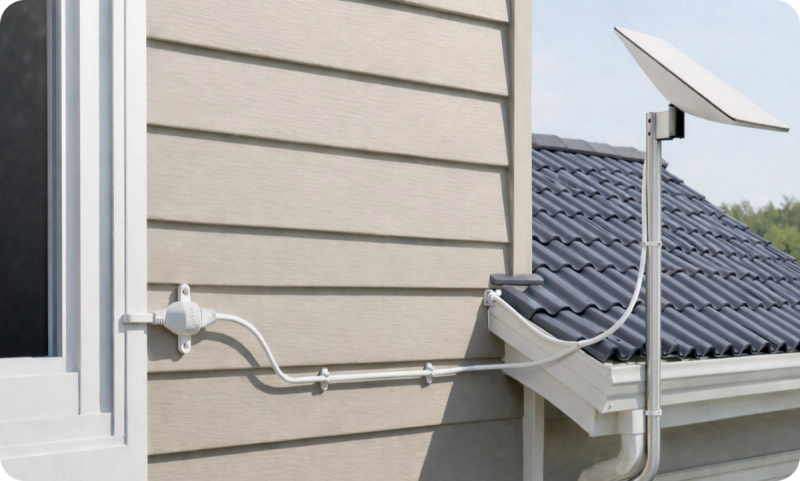
Outdoor internet setups are becoming the norm, but getting Ethernet back inside is still where most installs become challenging. Whether you’re running Starlink or mounting a cellular gateway outdoors, you eventually hit the same question: How do you route Ethernet indoors without drilling holes or compromising your building?
Here's how to simplify your setup while maintaining professional-grade performance.
The Outdoor Ethernet Challenge
Any setup that places networking equipment outside - like a Starlink dish or a cellular gateway in an outdoor enclosure - requires a reliable way to bring Ethernet indoors.
Most buildings simply weren’t designed for this. As a result, users are often left choosing between unideal options
Traditional Solutions That Often Fall Short
Drilling new holes is problematic for several reasons; permanent modifications to the building, potential to hit plumbing or electrical lines, and risk of water intrusion if not correctly sealed.
Reusing existing conduits can work in theory, but they're often already occupied by other cables, poorly placed for Starlink or ideal 5G outdoor signal, or not properly sized for Ethernet.
Leaving windows partially open creates security risks, lets in insects and moisture, wastes heating/cooling, and over time can damage cables where the window edge presses down.
A Clean Alternative: The Waveform Window Entry Cable
The Waveform Ethernet Window Entry Cable is designed specifically for outdoor networking setups that need a clean path indoors. It’s an ultra-thin Cat6A Ethernet passthrough that runs through a fully closed window, maintaining a weather-tight seal with no drilling or permanent changes.
It supports data speeds up to 10 Gbps to handle high bandwidth applications and PoE++ delivery up to 90 watts, allowing you to power outdoor devices without the need for separate a outlet.
The cable compresses to just 0.2 mm at the window entry point, allowing it to pass through virtually any window type while maintaining a proper seal. The cable has outdoor-rated construction, including a weatherproof connector that protects against moisture intrusion at one of the most common failure points in outdoor networking setups.

Waveform Ethernet Window Entry Cable: Ultra-Flat, High-Performance Passthrough Cable
- Flat ribbon design fits securely in most windows.
- Handles power and throughput needs for Starlink and all 5G Gateways.
- Durable and has built-in weatherproofing.
The cable compresses to just 0.2 mm at the window entry point, allowing it to pass through virtually any window type while maintaining a proper seal. The cable has outdoor-rated construction, including a weatherproof connector that protects against moisture intrusion at one of the most common failure points in outdoor networking setups.
This makes it especially well suited for:
Starlink installations where you want a clean entry path without modifying walls; ideal for rentals, temporary installs, or quick deployments.
Outdoor modem, cellular gateway or Waveform Outdoor Gateway Enclosure, for an easy way to bring power and data over a single PoE Ethernet cable outdoors.
Installation Overview
Plan Your Route
Identify the shortest path between your indoor router and outdoor equipment. Choose a window along that route that opens and closes smoothly.
Position the Cable
Fully open the window, lay the flat section across the frame, and leave slack on both sides.
Secure the Cable
Close the window fully and confirm it seals properly without pinching or shifting the cable. Test the window lock to ensure the seal is secure.
Connect and Test
Plug in your equipment, secure any loose cables, and test your connection.
Mount The Cable
Secure the indoor and outdoor connector ends using the adhesive film or screws provided.
For a detailed walkthrough, we've got a fully illustrated, in-depth installation guide below.
Helpful Resources
Ethernet Window Entry Cable Documentation
Unboxing & Overview
Frequently Asked Questions
Will this support Starlink's power and speed requirements?
Yes, our Window Entry Cable is specifically designed to handle both Power over Ethernet (PoE) and gigabit speeds required by Starlink.
Does this damage the window?
No, the ultra-thin design prevents any damage to windows or frames. The cable can be removed at any time without leaving marks.
Can I still open and close my window?
Yes, though we recommend choosing a window you don't frequently open. The cable can withstand occasional window operation without damage.
Is it really weatherproof?
The cable includes weatherproof construction and maintains a seal when properly installed. Thousands of customers use these cables in all weather conditions.
A Better Way to Finish Outdoor Installs
The Waveform Window Entry Cable offers professional-grade performance without requiring permanent modifications to your home. Its simple DIY installation and reliable all-weather operation make it perfect for both homeowners and renters.
Waveform Ethernet Window Entry Cable: Ultra-Flat, High-Performance Passthrough Cable
Everything needed for a clean, professional installation without the hassle of drilling or permanent modifications.
About the authors
 Sisanda Kheswa
Sisanda Kheswa is a Junior Product Manager at Waveform, where she owns the company’s third-party product business end-to-end — finding the products worth carrying, negotiating with vendors and distributors, running the launches, and keeping the unit economics honest. She also owns how those products show up for customers on the website and Amazon listings. She came to product from law, with an LLB and a postgraduate degree in intellectual property — which turns out to be good training for the work, since both are about reading complicated systems carefully and advocating hard for the person whose interests are on the line. In her case, that person is always the customer: she spends most of her time gathering real insight, surfacing the problems worth solving, and making sure the customer’s voice stays primary to what Waveform builds and sells.
About Waveform
At Waveform we help enable reliable cellular connectivity, everywhere. Trusted by thousands of consumers as well as NASA, Tesla, Stanford, and more. Learn more about Waveform
Suggested articles
See All Guides
Running Cable Through Walls: Our Detailed Guide
By Triona Giblin · 5 min read

Our Guide for Aiming External MIMO Antennas
By Marcus Carstens · 9 min read
The Definitive Guide to Multi-WAN Internet
By Marcus Carstens · 51 min read