
















Verizon Jetpack MiFi 7730L External Antenna Guide
Why you can trust Waveform
Waveform is the leading provider of solutions for improving cellular signal and connectivity. Our team of experts has decades of combined experience in wireless communication and remains committed to providing honest, data-driven reviews and recommendations. We rigorously test every product we sell and maintain complete editorial independence. No company can pay to influence our reviews or product ratings.
Read more about Waveform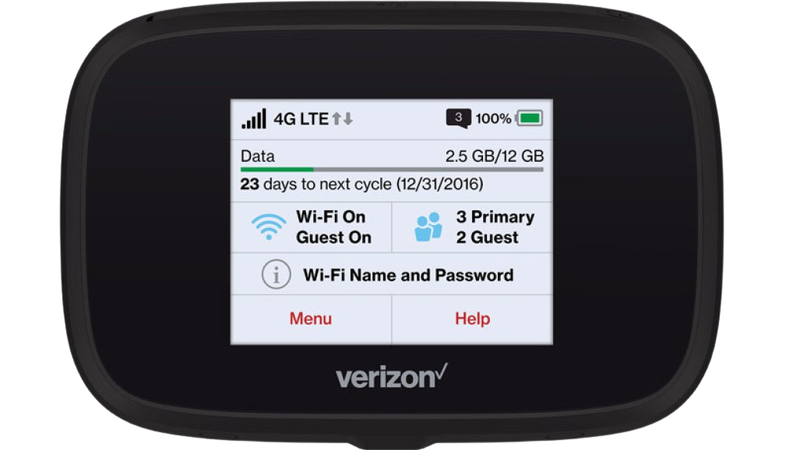
- The Best External Antennas For the Verizon Jetpack 7730L
- Why External Antennas Are Critical for Improving Data Rates
- Positioning and Aiming MIMO Antennas
- Verizon Jetpack MiFi 7730L Technical Specifications
- Other Helpful Resources
- A helpful video by Mobile Internet Resource Center
- Verizon's support page for the Jetpack 7730L
- Documentation
Looking to get the best possible data rates from your Verizon Inseego Jetpack MiFi 7730L?
You’ll want to purchase and connect external MIMO antennas to the device’s two TS9 ports.
In this guide, we'll:
- Recommend the best external antennas to use.
- Show where the TS9 ports are located on the Jetpack.
- Explain how to aim the antennas for best results.
Note: The Verizon Jetpack MiFi 7730L was replaced in October 2018 by Verizon's latest flagship hotspot - the MiFi Jetpack 8800L. Check out our guide for the 8800L here.
The Best External Antennas For the Verizon Jetpack 7730L
Using a MIMO antenna outside your building, pointed at the nearest tower, can help you get the fastest LTE data rates possible.
The Verizon Jetpack 7730L has two TS9 ports on the bottom, covered by little grey caps. These allow for a 2x2 MIMO antenna to be connected to the device.
We recommend two different MIMO antenna options for use with the Verizon Jetpack MiFi 7730L by Inseego:

Waveform DualMini: 2x2 MIMO Window Antenna
Our easiest install: this low-profile 2x2 MIMO antenna mounts on a window or outside wall, no roof mount needed, and still delivers a meaningful 4G LTE and 5G speed improvement for your hotspot or router.
For most users the best external antenna choice for the Verizon Jetpack MiFi 7730L is our DualMini 2x2 MIMO antenna. This antenna doesn’t require line-of-sight to the tower.

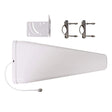
However, if you have line of sight to the nearest tower, we recommend using a DualPlus MIMO log periodic antenna kit instead. The higher gain on these antennas can get you better performance, but only when you have a straight shot to the tower.
Why External Antennas Are Critical for Improving Data Rates
Most people think that external antennas primarily help you increase your data rates by increasing the signal strength. But that's not the case.
An increase in signal strength is often less important than other ways that external antennas help.
Here are the three main ways that external antennas help you increase your data rates:
They Improve Signal Quality
In 4G LTE networks, signal quality is measured as SINR (Signal to Interference plus Noise Ratio) or sometimes as RSRQ (Reference Signal Received Quality).
Improving signal quality has a huge impact on your data rates.
Higher data rates allow your hotspot to communicate using "higher order modulation schemes." That means they can use the same wireless spectrum to send more data per second.
However, there's one big caveat:
In order to improve your signal quality, you need to both aim and shield your outdoor antenna properly. We talk more about this in the next section.
They Allow You To Connect On More Bands
Hotspots like the Jetpack 7730L support an LTE feature called "carrier aggregation."
Carrier aggregation allows the Jetpack 7730L to connect on multiple cellular bands simultaneously.
The more bands you're connected on, the greater the bandwidth, and the higher your data rates.
However, many of the higher frequency bands aren't able to penetrate into buildings. Using external antennas allows you to access higher frequency bands, which are often less congested and offer higher speeds than lower frequency bands.
MIMO Isolation
MIMO (Multiple Input Multiple Output) technology uses signals travelling along multiple paths simultaneously, increasing both bandwidth and reliability in wireless connections.
MIMO isolation is the antenna's ability to handle several data streams at once, cleanly and without interference, leading to quicker data speeds and steadier connections
Our external antennas are specifically designed for superior MIMO isolation, and dramatically outperform standard built-in antennas found in most home devices.
This means you'll see a more reliable connection with enhanced bandwidth, ensuring smoother streaming, gaming, and browsing with minimal interruptions.
Positioning and Aiming MIMO Antennas
Positioning and aiming MIMO antennas well is crucial to getting the best performance to your Verizon Jetpack 7730L, or indeed any other hotspot.
We've actually compiled a detailed instruction manual to accompany our own MIMO Antenna Kits, where we go into depth on the best ways to aim the antennas.
The goal is to find the best location and direction for the antenna(s), to maximize data rates to the Jetpack. It can take a little patience, but can have a huge impact – it’s worth a bit of extra effort!
Before getting started, it's always a good idea to run a couple of speed tests indoors from a device connected to your Jetpack's WiFi. The results will fluctuate a little, but this is the baseline you're trying to improve.
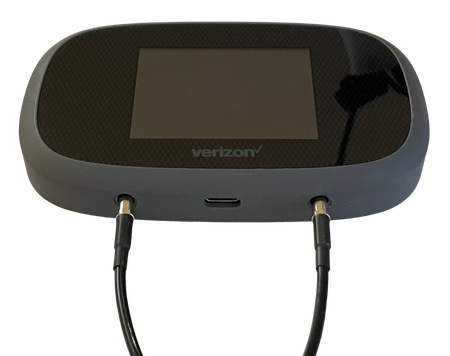
Now connect the MIMO antennas to your Verizon Jetpack MiFi 7730L via the TS-9 ports, like we've done with the very similar MiFi 8800L above, and go outside with your "test-rig".
With each location and direction you try, run a couple speed tests, and make a note of the results. Here are all the locations and directions where we recommend testing your MIMO antenna:
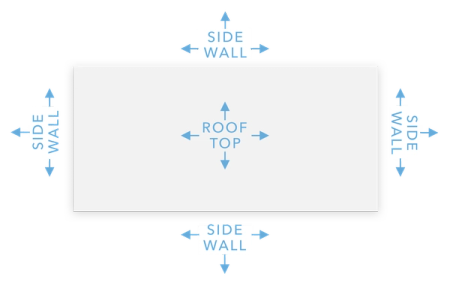
Pro tip: Don’t just go to the highest point of the roof! While signal is generally stronger the higher you go, there’s also often more interference. We’ve found it’s often better to mount the antenna(s) on the side of the building where the structure can shield the antennas from interference.
Once you've found the position which gets you the highest data rates to the Jetpack, that's where you'll want to install the MIMO antenna. Go ahead and mount the antenna, run cables inside, connect everything up, and enjoy superior data rates!
Verizon Jetpack MiFi 7730L Technical Specifications
Supported 4G LTE bands in the US
- Verizon: B2, B4, B5, B13, B66,
B46,B48 - AT&T: B2, B4, B5, B66,
B12,B14,B17,B29,B30 - T-Mobile: B2, B4, B5, B66,
B41,B25,B26,B71,B12
Cellular Modem
- Model: Unknown
- MIMO Support: 2x2 with internal or external antennas
- LTE-A Carrier Aggregation: Yes (3x 20 Mhz channels)
- LTE Performance Category: Cat 20
- Max Theoretical Speeds: 450Mbps Download, 50Mbps Upload
Wi-Fi
- Technologies: 802.11 b/g/n/a/ac
- Bands: Simultaneous 2.4 GHz and 5.8 GHz
Ports
- Cellular Antenna Ports: Dual TS-9
- Other Ports: USB-C, USB-A
Other
- Claimed battery life: 24 hours
- Can Be Powered Without a Battery: No
Other Helpful Resources
A helpful video by Mobile Internet Resource Center
Verizon's support page for the Jetpack 7730L
Documentation
About the authors
 Sina Khanifar
Sina is the CEO and co-founder of Waveform, with nearly 20 years of experience in cellular connectivity. Passionate about wireless technology, he stays hands-on and has installed everything from MIMO antennas to full-scale DAS systems. Over the years, he has worked on projects ranging from small residential setups to large commercial deployments. His deep technical expertise allows him to solve complex connectivity challenges with innovative solutions. Sina is committed to advancing the industry and ensuring reliable connectivity for businesses and consumers alike.
About Waveform
At Waveform we help enable reliable cellular connectivity, everywhere. Trusted by thousands of consumers as well as NASA, Tesla, Stanford, and more. Learn more about Waveform
Suggested articles
See All Guides
Verizon Orbic Speed 4G (RC400L) Optimization Guide
By Austin Rutten · 4 min read
Verizon Orbic Speed 5G (R500L5) Optimization Guide
By Austin Rutten · 4 min read