













Wilson Pro 1100 (460147/461147) Signal Booster Kit
by: Wilson


by: Wilson
Wilson Pro 1100 (460147/461147) Signal Booster Kit
This product has been discontinued

The manufacturer of this product does not allow it to be sold online.
Please contact us by calling 800-761-3041 or using this form if you're interested in purchasing this unit.
Contact us to purchase
We're the leading online distributor of WilsonPro products and stock their entire lineup of amplifiers, antennas, and accessories.
No matter what WilsonPro part you need, you can rest assured that we carry it.
 Free, fast shipping
Your products will generally ship within 1 to 2 business days, and shipping is free for all orders over $99 (within the continguous US states).
 90-Day Money-Back Guarantee
We offer a 90-day Money-Back Guarantee on all our products (except a handful of that are custom-built per order - there'll be a note anytime that's the case). That means if you're unhappy with your purchase in any way, you can simply initiate a return online and send it back to us for a refund.
Our guarantee is just that: we won't mess you around, we'll just make it happen.
 Warranty
Wilson products come with a manufacturer's warranty against defects in workmanship and materials.
Contact us at 1-800-761-3041 or email us at [email protected] if you have any questions about the manufacturer's warranty.
 Unlimited free expert support
Buying from Waveform gets you free, unlimited help from our team of signal experts.
Our signal engineers have been helping customers improve their signal for over 10 years. No matter what your question, we're here to help. We don't just sell you a product - we sell you a solution, and we stand by each and every product we offer.
 Carbon neutral deliveries
Offsetting All Carbon From Product Deliveries
With every order, we donate a part of our profits to some of the most promising climate solutions on Earth. We also fund cutting-edge carbon removal projects that have the potential to reverse climate change.
Description
Released in May 2019, the Wilson Pro 1100 is a powerful cell signal amplifier that boosts 2G, 3G, and 4G LTE voice and data coverage on all major US and Canadian carriers.
The Wilson Pro 1100 uses the strongest downlink power (15 dBm) permitted by the FCC to provide the largest possible indoor signal coverage. Wilson Electronics XDR (Extended Dynamic Range) technology balances and compensates for strong incoming signal to prevent system shutdowns.
The Pro 1100 is ideal for large homes and commercial buildings. It supports multiple simultaneous users, and it supports all cellular devices and all cell phone carriers.
5 Critical Tips for the Wilson Pro 1100:
1. Deciding between the 50-Ohm and 75 Ohm systems
The Wilson Pro 1100 comes in two flavors:
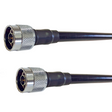
- 460147 with N-type connectors and 50 Ohm cable (our recommendation)
- 461147 with F-type connectors and 75 Ohm cable
Which should you buy? Well. it depends on which is more important to you: ease of install, or performance.
F-type connectors and 75 Ohm cable are the standard for cable TV and satellite connections, but they're typically lower performance. The cables are more lossy, which means weaker signal. However, the benefit is that if you have existing RG11 cable in the building, you can use the same cable to install your Pro 1100.
N-type connectors and 50 Ohm cable offer better performance. That means your cables will have lower loss, and thus your installed system will have a larger coverage area.
All else being the same, we recommend choosing the 460147 variant with N-type connectors to maximize the performance of the system. However, if you have a compelling reason to use F-type variant, like existing tools or cabling you can use to make your install easier, go for it! The overall performance difference is relatively small.
2. Take signal measurements before you buy
The Wilson Pro 1100 can cover up to an area of up to 35,000 square feet, but only if your outdoor signal is strong enough. This isn't true for just the Pro 1100, but across the board for all signal boosters.
We strongly recommend measuring your outdoor signal and speaking to our team of Signal Experts before you purchase. Our Signal Experts can help guide you to the best solution based on your signal conditions.
3. Getting your outdoor antenna positioned correctly is critical
As we explain in our Signal Booster Guide, the bars on your phone are more than just signal strength. Signal quality is absolutely critical.
The only way to improve the signal quality coming into your booster is getting the outdoor antenna positioned correctly. Our team of Signal Experts can help guide you as you install the Pro 1100.
4. Consider the Wilson Pro 1000C
If you're in a larger, commercial space, you may want to consider the Wilson Pro 1000C. Released in early 2019, the Wilson Pro 1000C includes robust, cloud monitoring via a built-in LTE modem. If you'd like to be able to set up alarms in case of any issues, the Pro 1000C is worth considering.
5. Consider the GO X and the Cel-Fi QUATRA 2000
Two units that compete with the Pro 1100 are the Cel-Fi GO G41 and the Cel-Fi QUATRA 2000. Both of these units are considered "carrier-specific" boosters by the FCC, which means they're that the FCC allows them to have 100 decibels gain. The extra gain means the QUATRA and GO X work better in remote areas with very weak outdoor signal. The QUATRA also uses ethernet cable in place of coaxial cable.
It's not all upside, though. The QUATRA 2000 and GO G41 have both benefits and disadvantages. For example, the GO 41 only works with one carrier at a time. The Quatra only works with 2 carriers at a time, so you need two sets for 4-carrier coverage. Installation can also be a little more complicated than the Wilson Pro products.
6. The Wilson Pro 1100 is designed to be part of a custom-designed system
For an ideal installation, the Pro 1100 should be designed into a custom system, with multiple antennas, splitters, couplers, and custom-length cables.
We offer complimentary design services using the industry-standard iBwave in-building design software. Simply contact our Signal Specialists and we'll chat through your building and requirements and help put together a custom solution for you.
Features
- Best in class coverage area
- XDR technology that prevents signal overload and booster shutdown
- Compatible with all U.S. and Canada cellular networks
- Three-year warranty
- FCC and Industry Canada certified
Benefits
- Fewer dropped calls and lost connections
- Faster, cleaner data transfers
- Strong, reliable connections even in weak signal areas
- Maximum possible indoor coverage area
- Extends battery life of cellular devices
Kit Contents
Wilson Pro 1100 N-Type/50 Ohm Kit - 460147
- Wilson Pro 1100 Signal Booster with N-Type connectors (460047)
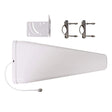
- Wilson N-Type Wide-Band Directional Yagi Antenna (314411)
- Wilson N-Type Wideband Indoor Dome Antenna (304412)
- 1x2' , 1x60' , 1x75' low loss 400-type coaxial cable
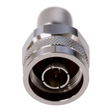
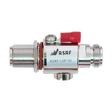
- Wilson N-Type Lightning Surge Protector (859902)
Wilson Pro 1100 F-Type/75 Ohm Kit - 461147
- Wilson Pro 1100 Signal Booster with F-Type connectors (461047)
- Wilson F-Type Wide-Band Directional Yagi Antenna (314475)
- Wilson F-Type Wideband Indoor Dome Antenna (304419)
- 1x2' , 1x60' , 1x75' low loss 400-type coaxial cable
- Wilson F-Type Lightning Surge Protector (859992)
Product Video
Specifications, Guides, and Downloads


| SKU |
|
|---|---|
| UPC |
|
| Weight | 19.88 lbs |
| Dimensions | 9 x 10 x 2 in |
| Frequency | 698-716 / 728-746 / 746-757 / 776-787 / 824-849 / 869-894 / 1850-1910 / 1930-1990 / 1910-1915 / 1990-1995 / 1710-1755 / 2110-2155 |
| Gain | 70 dB |
| Impedance | 50 ohm |
| Noise | 5 dB nominal |
| Power supply | 120V AC 0.5A |
| Connector type | N Female |
| Cable length | 2', 60', 75' |
| Cable type | Wilson400 |
| FCC notice |
Read full notice Collapse notice
This is a CONSUMER device. BEFORE USE, you MUST REGISTER THIS DEVICE with your wireless provider and
have your provider's consent. Most wireless providers consent to the use of signal boosters. Some
providers may not consent to the use of this device on their network. If you are unsure, contact your
provider. You MUST operate this device with approved antennas and cables as specified by the
manufacturer. Antennas MUST be installed at least 20 cm (8 inches) from any person. You MUST cease
operating this device immediately if requested by the FCC or a licensed wireless service provider.
WARNING. E911 location information may not be provided or may be inaccurate for calls served by using
this device. Please note, the four largest carriers - AT&T, T-Mobile, Verizon and Sprint - and
more than 90 regional carriers have given blanket consent for use of all boosters certified to the new
FCC standards.
|
| CA Prop 65 Warning |
Read full warning Collapse warning |
Customer Reviews
Customers Also Bought

We stand behind the products we sell. We’ll accept a return anytime within 90 days if you’re not happy with your purchase from us.

Any order over $99 ships free. And we get packages out the door quickly: 82% of orders are shipped within 24 working hours.

Our signal experts have helped design and install kits in buildings of over 200,000 sq ft. Let us help you find the right product.