
















This product has been discontinued

Discontinued
 Free, fast shipping
Your products will generally ship within 1 to 2 business days, and shipping is free for all orders over $99 (within the continguous US states).
 90-Day Money-Back Guarantee
We offer a 90-day Money-Back Guarantee on all our products (except a handful of that are custom-built per order - there'll be a note anytime that's the case). That means if you're unhappy with your purchase in any way, you can simply initiate a return online and send it back to us for a refund.
Our guarantee is just that: we won't mess you around, we'll just make it happen.
 3 Year Warranty
Waveform products come with a 3 year manufacturer's warranty against defects in workmanship and materials.
Contact us at 1-800-761-3041 or email us at [email protected] if you have any questions about the manufacturer's warranty.
 Unlimited free expert support
Buying from Waveform gets you free, unlimited help from our team of signal experts.
Our signal engineers have been helping customers improve their signal for over 10 years. No matter what your question, we're here to help. We don't just sell you a product - we sell you a solution, and we stand by each and every product we offer.
 Carbon neutral deliveries
Offsetting All Carbon From Product Deliveries
With every order, we donate a part of our profits to some of the most promising climate solutions on Earth. We also fund cutting-edge carbon removal projects that have the potential to reverse climate change.
Description
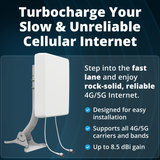
If you're looking to get the absolute best data rates for your LTE or 5G hotspot, using cross-polarized MIMO external antennas is often the best option.
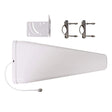
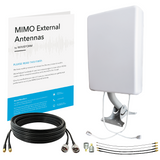
Our MIMO Panel External Antenna Kit for 4G LTE/5G Hotspots & Routers includes everything you need to mount your external antennas, as well as the adapters necessary to connect the MIMO antenna to your hotspot or LTE router.
Our MIMO Panel antenna offers up to 9 dBi gain between 1710 and 2700 MHz, and 6 dBi gain between 600 MHz and 900 MHz.
Including our Ultra-Flexible Twin-RS240 Cables
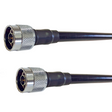
Our Twin-RS240 30ft cables make it easier than ever to connect your 2x2 MIMO Antenna to your LTE router, hotspot, or signal booster system. This cable assembly has two strands of low-loss RS240 coaxial cable glued together, with SMA-Male connectors on the "indoor" end, to minimize the bulk of running multiple cables and make installation easier than ever.
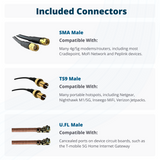
Also included in the bundle are two SMA-Female to TS9-Male pigtail adapters, two SMA-Female to U.FL pigtail connectors, and two SMA-Male to N-Male connectors, to ensure you have everything you might need to connect almost any device.
Looking to extend your cables for a longer cable run? You can rely on our custom-cut SMA extension cables, available in various lengths to suit your needs. Please note that these cables are sold individually, so ensure that you purchase two cables to complete your setup.
Detailed Guides for your 4G LTE/5G Router
Every hotspot and router is different, so we've written up detailed guides for some of the most common devices here.
Adapters and Connectors
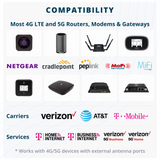
Our Twin RS240 coax cables have SMA-Male connectors on the "indoor" end. These are able to connect directly to LTE routers, like the devices by Cradlepoint, MoFi, and Pepwave, which typically make use of SMA connectors.
Battery-powered hotspots like the Verizon MiFi Jetpack and the Netgear Nighthawk M1 MR1100 may have TS9 connectors. Some devices without external antenna ports like the T-Mobile High Speed 5G Internet Gateway may have internal U.FL connectors.
We include both TS9-Male to SMA-Female and U.FL to SMA-Female adapters, which allow our MIMO antennas to be connected to almost any hotspot or LTE router.
If you're unsure of which adapter you need, how to connect it, or where to begin, we suggest reading our guide for your router, or referring to your user manual. We know, there's a lot of information out there and this can get very technical.
Don't be afraid to reach out to us for support!
Frequency Bands Support
Our wideband MIMO panel antennas support almost every 3G, 4G LTE, and low/mid-band 5G service in use in the US and across the world today:
Supports all 4G LTE and 5G bands between 600 and 2700 MHz, including:
- AT&T: B2, B4, B5, B12, B17, B29, B30, B66
- Verizon: B2, B4, B5, B13, B66
- T-Mobile: B2, B4, B5, B12, B66, B71
All supported US Frequency Bands:
- Band 2 (1900 MHz)
- Band 4 (1700/2100 MHz)
- Band 5 (850 MHz)
- Band 12 (700 MHz)
- Band 13 (700 MHz)
- Band 14 (700 MHz)
- Band 17 (700 MHz)
- Band 25 (1900 MHz)
- Band 26 (850 MHz)
- Band 30 (2100 MHz)
- Band 66 (2100 MHz)
- Band 71 (600 MHz)
All supported LTE Bands: Band 1-10, Band 12-20, Band 23, Band 25-30, Band 33-41, Band 65-71, B85
All supported 5G Bands: n1, n2, n3, n5, n7, n8, n12, n14, n18, n20, n25, n26, n28, n29, n30 n34, n38, n39, n40, n41, n65, n66, n70, n71, n80, n81, n82, n83, n84, n86, n89, n90, n95
Picking the Right Kit
MIMO Panel vs MIMO Log Periodic
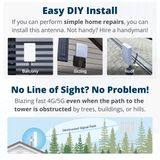
We also sell a MIMO 2x2 Log Periodic Antenna Kit for Hotspots/Routers that is very similar to this kit but with slightly higher gain and slightly narrower directionality. We recommend using the MIMO Log Periodic Antennas if you have line-of-sight to your nearest cell towers. If you're surrounded by trees, buildings, or hills, this MIMO Panel Antenna Kit will likely perform somewhat better than the Log Periodic Antenna Kit.
2x2 MIMO vs 4x4 MIMO
Installing external MIMO antennas is all about maximizing your data speeds. Different routers and hotspots have different configurations for external antenna ports.
Most hotspots, like the Netgear Nighthawk M1 and Verizon Jetpack 8800L will have two antenna ports, while some of the more advanced routers like the T-Mobile 5G Gateway and the MoFi 5500 often have four ports.
Which kit you need depends entirely on the device you have. If you've got two antenna ports, then you need the 2x2 MIMO Antenna Kit, while if you're working with four external antenna ports, it's usually best to go with a 4x4 MIMO Antenna kit like the Waveform QuadPro 4x4.
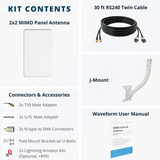
Kit Contents
- 1x Wideband MIMO 2x2 Panel Antenna including pole-mount hardware
- 1x Twin-RS240 N-Male to SMA-Male Cable bundle
- 1x 15ft or 30ftTwin RS240 N-Male to SMA-Male Coaxial Cable
- 2x TS9-Male to SMA-Female Adapters
- 2x U.FL to SMA-Female Pigtail Adapters
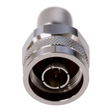
- 2x N-Male to SMA-Male Barrel Adapters
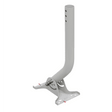
- 1x Universal J-Mount Antenna Mount
- Optional: 2x Lightning Surge Protector Kit including 5 ft RS240 cable and grounding cable
- User manual
Optional Lightning Surge Protectors
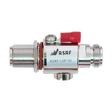
We highly recommend using our Waveform Lightning Surge Protector Kits to protect your hotspot or 4G LTE/5G router from electrical surges due to lightning. Our Lightning Surge Protector Kits include a 5 ft RS240 Jumper cable and a short length of grounding cable.
The surge protectors should be installed just before the coaxial cable enters the building. If you're unsure about grounding your outdoor antenna, We've got a guide on how to ground a rooftop antenna.
Warranty
Specifications, Guides, and Downloads

| SKU |
|
|---|---|
| UPC |
|
| CA Prop 65 Warning |
Read full warning Collapse warning |
Customer Reviews
Customers Also Bought

We stand behind the products we sell. We’ll accept a return anytime within 90 days if you’re not happy with your purchase from us.

Any order over $99 ships free. And we get packages out the door quickly: 82% of orders are shipped within 24 working hours.

Our signal experts have helped design and install kits in buildings of over 200,000 sq ft. Let us help you find the right product.